

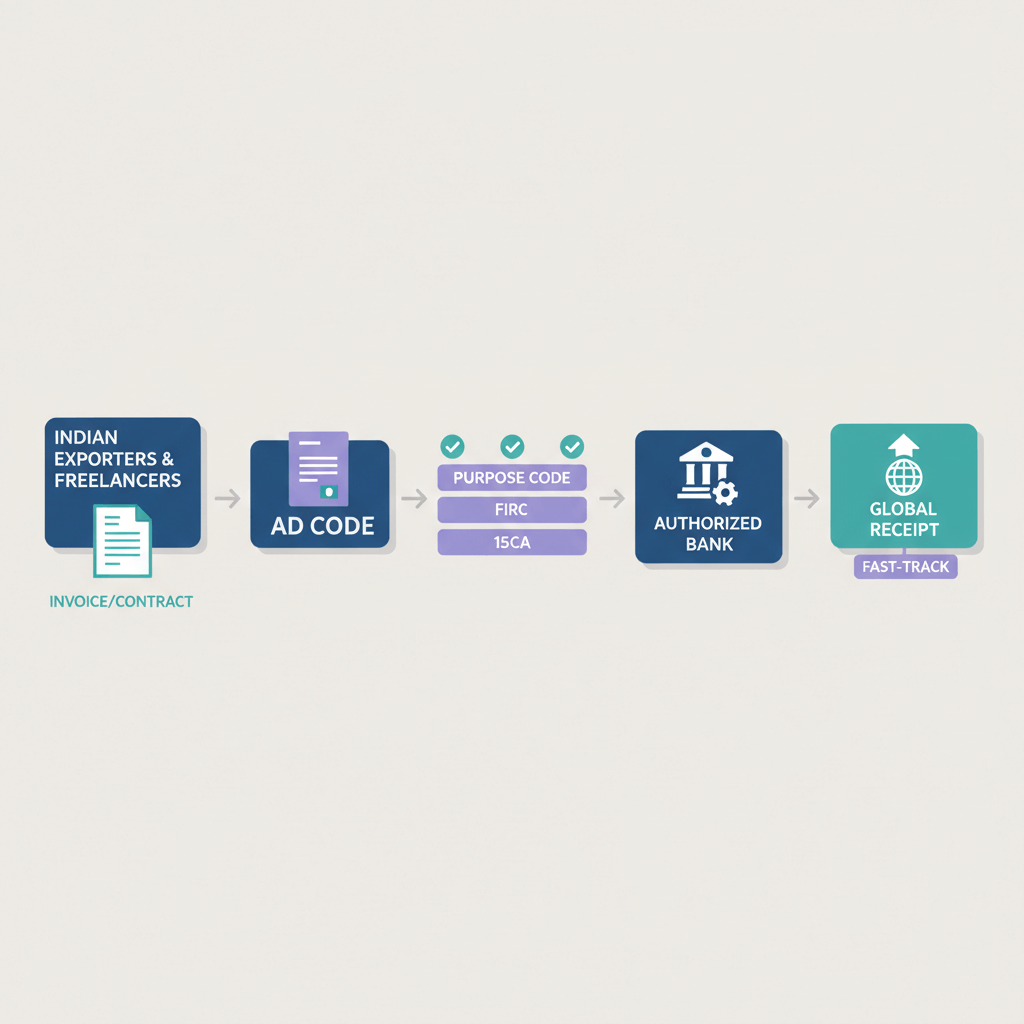


Key takeaways
- An AD Code is a 14 digit number issued by your bank, it links your IEC to your forex enabled account so customs can generate shipping bills and track export proceeds.
- Goods exporters must register their AD Code on ICEGATE and map every port they plan to use, service exporters usually do not need ICEGATE registration but need e-FIRA from their bank.
- Before you start, ensure exact name match between IEC and bank account, confirm your branch has AD status, and keep DSC or eSign ready for ICEGATE.
- Registration flow is simple, bank letter, ICEGATE submission, bank approval, port mapping, test run, most SMEs finish in about a week.
- Freelancers receiving only service payments should focus on fast e-FIRA generation, transparent FX and compliance proof, platforms like Karbon Business provide virtual USD, GBP, EUR accounts and auto e-FIRA.
- Detailed process references: see AD Code registration, register AD Code for agricultural exporters, and AD Code certificate.
What is an AD Code? The basics explained
An Authorized Dealer Code is a 14 digit identifier issued by your bank and authorized by RBI, it connects your export business to your bank account for foreign exchange transactions and enables customs systems to recognize and clear your shipments.
Think of the AD Code as your export passport, without it your shipping bill cannot be generated and your goods stay at the port.
Why it matters
- Customs clearance: ICEGATE needs your AD Code linked to your IEC to allow shipments to move.
- Shipping bill generation: No AD Code, no shipping bill, no export.
- Export proceeds tracking: RBI and FEMA compliance depend on the AD Code linkage to your bank.
- GST refunds and drawback: Linkage is needed to claim IGST refunds and duty drawbacks, without it you lose money.
How it differs from other codes
- IEC: Issued by DGFT, identifies you as an exporter or importer, this must exist before you obtain an AD Code.
- IFSC: Identifies your bank branch, it is not the AD Code.
- Shipping bill: The customs document generated only when your AD Code is active at the chosen port.
- e-BRC / e-FIRA: Bank proofs of export realization for goods and foreign inward remittance for services respectively, see the eBRC vs BRC guide.
To avoid confusion later, keep IEC and AD Code handy and distinct, many first timers accidentally share IEC when a broker asks for AD.
For a portal overview see the ICEGATE portal guide.
Who needs AD Code registration, and who does not
Goods exporters: AD Code is mandatory
If you export physical goods, apparel, engineering products, agricultural items, handicrafts, electronics, you must register your AD Code at each customs port you plan to use, then file shipping bills, enable GST refunds and duty drawback claims, and report export realization to RBI under FEMA.
Port specific rule: Map the same 14 digit AD Code separately at every port you use, Nhava Sheva, Chennai, Kolkata, ICD Tughlakabad, Bengaluru ICD, Hyderabad Air Cargo, and others.
Service exporters: AD Code on ICEGATE may not be required
If you export services only, software, design, consulting, content, digital marketing, you typically do not need ICEGATE AD Code because there is no shipping bill or customs clearance. You do need a forex enabled account at an AD branch and e-FIRA for tax filings and FEMA compliance.
Example: a freelance UI or UX designer in Bangalore receiving USD from a client does not file shipping bills, instead the designer ensures the bank is RBI authorized for forex and can issue e-FIRA within 24 hours.
Edge cases
- Exporting both goods and services: Register AD Code for goods on ICEGATE, ensure the bank issues e-FIRA for services.
- Changing ports: Re-map your AD Code in ICEGATE when you switch ports, activation is usually same day or next day.
- Multiple bank accounts: ICEGATE allows more than one AD Code per IEC, helpful if you segregate proceeds by product line or region.
Practical references: register AD Code for agricultural exporters and AD Code certificate.
Prerequisites checklist before you start
- IEC from DGFT, legal entity name must match your bank account exactly.
- GSTIN if registered.
- PAN of the business or proprietor, as applicable.
- Bank account details, account name, number, IFSC of an AD authorized branch.
- Cancelled cheque.
- ICEGATE account linked to your IEC, DSC or eSign ready.
- List of export ports you plan to use.
- Authorized signatory letter and bank contact details.
Missing even one item can add days to approval, prepare the full set and confirm name matches end to end.
Step 1: Get the AD Code letter from your bank
How to approach your bank
- Visit or call your primary branch and ask for the export desk or trade finance team.
- Request an AD Code letter in the bank’s format, clarify your export category, goods or services.
- Submit IEC, PAN, GST, cancelled cheque, business registration, and any relevant export licences.
Bank’s role and timeline
- The bank verifies compliance documents and ensures your account is forex enabled.
- They issue a 14 digit AD Code on official letterhead, signed and sealed.
- Typical turnaround is 1 to 3 working days, faster with exact name match and AD branch.
Common mistakes to avoid
- IEC name mismatch: Even small differences cause rejection, fix before submission.
- Non-AD branch: Confirm AD status, not every branch handles forex.
- Account not forex enabled: Ask explicitly if export proceeds can be realized, do not assume.
- Wrong signatory: Ensure an authorized officer signs the letter.
Extra guidance, see AD Code certificate.
Step 2: Register on ICEGATE and add your bank account
Step 2.1: Create or verify your ICEGATE login
Visit icegate.gov.in and log in with your IEC credentials, or create an account in minutes. Ensure DSC or eSign is active before you submit, test sign on the portal if needed. For a walkthrough, read the ICEGATE portal guide.
Step 2.2: Navigate to Bank Account Management
Go to Financial Services, Bank Account Management, AD Code Registration, then select Add New Bank Account or Register AD Code.
Step 2.3: Fill the registration form
- Bank name and branch name, exactly as on the AD Code letter.
- Account number and IFSC of the AD branch.
- Account holder name, must match IEC and bank records, character for character.
- AD Code, 14 digits.
- Ports you intend to export from, select all that apply.
- Export category, goods, services, or both.
Double check numbers and names, a single typo causes rejection.
Step 2.4: Upload supporting documents
- AD Code letter on bank letterhead, PDF.
- IEC, PAN, GST copies.
- Cancelled cheque.
- Authorized signatory letter, and any export licences if applicable.
Use clear scans, blurry images often trigger clarifications and delays.
Step 2.5: E-sign and submit
Review your data carefully, then e-sign using DSC or eSign and submit to customs. Note down your IRN and DRN for tracking.
Step 2.6: Bank approval process
The bank receives the approval request, verifies details in 1 to 5 working days, and marks your status Approved on ICEGATE. If the bank asks for clarifications, respond quickly via e-Sanchit.
Step 3: Map your AD Code to export ports
Open your approved AD Code account in Bank Account Management, click Map Port or Add Port, select each port, confirm and e-sign. Without port mapping, customs at that port will reject your shipping bill.
You can add or remove ports later, updates typically activate the same day.
Step 4: Validate your setup with a test run
Goods exporters should ask their CHA or freight forwarder to file a test shipping bill with the new AD Code, validate IGST refund eligibility, and check e-BRC issuance within days, see the eBRC vs BRC guide and the new eBRC made easy for Indian freelancers explainer.
Service exporters should validate the first foreign remittance and confirm e-FIRA generation within 24 hours.
Operational flow after registration
For goods exporters
- CHA files shipping bills citing your AD Code and IEC.
- Customs clears goods and EDI notifies your bank.
- Bank realizes export proceeds and issues e-BRC.
- GST refunds or drawbacks are credited in 7 to 30 days.
For service exporters
- Client pays by ACH, SEPA, wire, or platform.
- Bank generates e-FIRA within 24 hours.
- Use e-FIRA for GST ITC and income tax filings, no shipping bill or ICEGATE needed.
Common pitfalls and how to fix them
Pitfall 1: Account name mismatch
Fix by updating the bank account name to match IEC exactly or by amending IEC, correcting the bank record is usually faster.
Pitfall 2: Using IFSC of a non-AD branch
Open or switch to an AD branch account, obtain a fresh AD Code letter, update ICEGATE, then re-map ports.
Pitfall 3: DSC or eSign failures
Renew DSC, test sign on ICEGATE, or use Aadhaar based eSign if DSC fails repeatedly.
Pitfall 4: Port specific rejection
If customs says AD Code not mapped, add the port in ICEGATE and refile, delay is typically 1 to 2 days.
Pitfall 5: Multiple ports or banks
Register separate AD Codes for each bank and map them to specific ports, then choose the right AD Code when filing shipping bills.
Pitfall 6: Changing banks or IFSC
Get a new AD Code letter, add the new account in ICEGATE, map ports, deactivate the old account to avoid confusion.
Pitfall 7: Bank approval rejected
Call the export desk, confirm the exact reason, fix IEC, PAN, GST, or KYC mismatches, then resubmit.
Special note for Indian freelancers and service exporters
If you export services only, skip ICEGATE and port mapping. Focus on a forex enabled AD branch account and e-FIRA, your proof for GST and FEMA compliance.
Why this matters, e-FIRA is mandatory proof of foreign inward remittance, without it, you cannot claim GST input credits or demonstrate FEMA compliant realization.
Tools built for compliant inward remittances include Karbon Business which offers virtual USD, GBP, EUR, CAD receiving details, flat platform fees, mid market FX, automatic e-FIRA in 24 hours, and INR settlement in 24 to 48 hours, purpose built for freelancers.
Example workflow for a freelance developer
- US client sends $5,000 via ACH or wire to your Indian account.
- Bank realizes INR and generates e-FIRA within 24 hours.
- You download e-FIRA from the trade portal and attach to GST returns under LUT and to your ITR.
- No shipping bill, no customs, compliance is bank based.
Practical examples
Example 1: Small apparel exporter
Axis or HDFC issues your AD Code in 2 days, you register on ICEGATE, select Nhava Sheva and Tughlakabad, bank approves in 3 days, you map ports and file a shipping bill, e-BRC arrives in a few days, IGST refunds hit your account in 2 to 4 weeks.
Example 2: Freelance UI or UX designer
Open a current account at an AD branch, get paid by ACH or wire, your bank issues e-FIRA in 24 hours, you attach it to GST and ITR, no ICEGATE needed.
Timelines and checklist recap
Quick timeline for goods exporters
- Bank AD Code letter, 1 to 3 working days.
- ICEGATE submission, 1 day.
- Bank approval, 1 to 5 working days.
- Port mapping, same day.
- Test shipping bill, 1 to 3 days.
- Total time, about a week.
Readiness checklist before your first shipment
- AD Code letter on bank letterhead.
- IEC, PAN, GST, exact name matches.
- Forex enabled AD branch account.
- ICEGATE credentials, DSC or eSign ready.
- AD Code approved and ports mapped.
- CHA engaged and test e-BRC or e-FIRA validated.
Compliance reminders and resources
Keep these in compliance focus
- KYC must be current, outdated KYC triggers holds.
- IEC must be active and valid via DGFT status.
- GST returns timely filing is essential for refunds.
- FEMA repatriation timelines, keep complete audit trails, invoices, bills of lading, e-BRC, e-FIRA.
Key resources
- ICEGATE for AD Code registration and shipping bills, and the ICEGATE portal guide.
- DGFT for IEC status and amendments.
- RBI for AD bank lists and FEMA circulars.
- CBIC for refunds and public notices.
- Your bank’s export desk for AD Code letters, e-BRC, e-FIRA, and EDPMS closure, see the EDPMS closure guide.
- GST LUT and zero rated supplies, see LUT & GST Exports.
- Software exports via STPI, see SOFTEX filing online.
Operational checklist after registration
- Save your AD Code, ICEGATE credentials, and bank export desk contact.
- Share the AD Code with your CHA.
- Confirm e-BRC generation process with your bank.
- Review GST refund or drawback claims quarterly.
- Keep IEC, GST, PAN, bank letters, e-BRC, e-FIRA organized in cloud storage.
- Update ICEGATE if you add new ports or change banks.
- Check ICEGATE notices quarterly for rule changes.
Closing: Your AD Code registration path
For goods exporters: Bank letter, ICEGATE registration, port mapping, and a test shipping bill, done in about a week if documents are ready. Ensure exact name match and AD branch status from day one.
For service exporters: Skip ICEGATE, ensure fast e-FIRA and transparent FX, platforms like Karbon Business automate e-FIRA and speed INR settlement.
Immediate next steps: verify IEC and GST status, confirm AD branch and request the AD Code letter, submit on ICEGATE with clean scans and e-sign, track approval daily, map ports, and validate with a test run. Documentation discipline is your best friend, clean records prevent delays and accelerate refunds.
FAQ
Can I keep more than one AD Code and bank for exports to manage different ports and buyers?
Yes, you can register multiple AD Codes under the same IEC, each issued by a different bank, then map them to specific ports in ICEGATE. When filing shipping bills, choose the right AD Code so proceeds land in the intended account. Larger SMEs often use HDFC for sea freight at Nhava Sheva and ICICI for air cargo at Bengaluru, this setup is fully supported on ICEGATE.
I shifted from Chennai to Nhava Sheva, do I need a new AD Code or just re-map the port?
You usually keep the same 14 digit AD Code, log into ICEGATE, open Bank Account Management, select your approved account, click Map Port, add Nhava Sheva, and e-sign. Activation is typically same day or next day. Your bank letter remains valid, the change is portal side only.
My bank merged and IFSC changed, what happens to my existing AD Code registration?
Ask the bank for a fresh AD Code letter reflecting the new IFSC, then add a new bank account on ICEGATE, map all ports, and optionally deactivate the old account. Use the new AD Code for all future shipping bills, existing shipments and their e-BRCs remain valid. Stay proactive to avoid day of shipment surprises.
I am a freelancer exporting services, do I need an AD Code on ICEGATE or only e-FIRA?
For pure services, focus on a forex enabled AD branch account and e-FIRA from your bank for each inward remittance, shipping bills and ICEGATE registration are not required. If you want faster payouts and automated compliance, Karbon Business issues e-FIRA within 24 hours and settles INR in 24 to 48 hours.
Can one AD Code be used for many different export products like apparel, handicrafts, and electronics?
Yes, the AD Code links your IEC and bank account, not a specific product. You can ship many categories using the same AD Code, provided each product complies with sector licences or restrictions. The shipping bill and commercial invoice carry the product details, the AD Code is just the account identifier.
How do I confirm my branch is an RBI Authorized Dealer for forex, I am worried about rejections?
Call the branch and ask if it is an AD Category I branch under FEMA, or request the export desk details. If it is not AD authorized, the bank will guide you to switch to the nearest AD branch, typically done in the same city. Without AD status, your ICEGATE submission gets rejected during bank verification.
ICEGATE or bank approval is stuck for more than a week, what should I do to speed it up?
Check the ICEGATE dashboard for clarification notes, usually a scan quality issue, incorrect IFSC, or name mismatch. Call your bank’s export desk and ask for the customs interface in charge, share IRN and DRN, and submit any missing document via e-Sanchit. With complete KYC and exact name match, approvals typically move within 1 to 2 working days.
Can my CHA file shipping bills before the AD Code shows Approved and mapped on ICEGATE?
No, customs validates AD Code, IEC, and port mapping in real time. Filing before approval results in system errors and rejected bills. Wait for Approved status and mapped ports, then file with confidence and avoid day of shipment delays.
I am a solo freelancer, what is the simplest way to receive USD or EUR with proof for taxes?
Use a service exporter workflow, share local rail details to clients, ACH for USD or SEPA for EUR, then rely on e-FIRA for compliance. Platforms like Karbon Business offer virtual USD, GBP, EUR receiving accounts, mid market FX, a flat platform fee, and e-FIRA within 24 hours, you get faster credits and clean documents for GST and ITR.
Which RBI purpose code should my bank use for service exports so e-FIRA works for GST and ITR?
Your bank uses P10xx family codes for inward service exports, for example software or consulting, based on your invoice description. Share clear purpose details and the invoice to the bank, avoid generic or consumer code misuse which may cause holds. If your bank miscodes, request a correction with invoice and client details, then ask for an updated e-FIRA.
If my client sends money under BEN or SHA, will my amount be short, how do I avoid fees?
Under BEN or SHA, intermediary or correspondent bank fees may be deducted before credit reaches India, so your net amount can be lower. Ask your client to send under OUR for full amount delivery, or use local rails like ACH for USD and SEPA for EUR with platforms that pass mid market FX and minimal fees, Karbon Business is designed for this.
Do freelancers need EDPMS closure and e-BRC, or is e-FIRA enough for services?
For service exports without shipping bills, e-FIRA suffices for GST and ITR proof, there is no shipping bill to close on EDPMS. If you do export goods, you will need EDPMS closure and e-BRC from your bank, learn the steps in the EDPMS closure guide.
Should I file LUT for zero rated services or pay IGST and claim refund later, which route saves cash?
Most freelancers prefer filing LUT for the financial year and issuing zero rated invoices, this avoids paying IGST and waiting for refunds, it is better for working capital. If you already paid IGST, you can claim refunds but expect timelines, for quick steps see LUT & GST Exports.
If my bank asks for SOFTEX for software exports, do freelancers really need it, how do I avoid delays?
It depends on your service and contract structure. Many banks clear inward software service remittances with proper invoices and purpose codes, issuing e-FIRA without SOFTEX. Where SOFTEX is required by STPI jurisdiction or bank policy, file online and attach the certified forms, use the SOFTEX filing online guide to beat deadlines and avoid penalties.
