Business

Purpose Codes Decoded: Master P1502 Refunds Fast

Content
share on
Contents
Share On

Key takeaways

  • P1502 is the RBI export refund code, use it for reversals or refunds of previously realized export proceeds, never reuse the original export service code.
  • Tagging refunds as P1502 keeps your e-FIRA accurate, prevents inflated export income, and helps avoid audit issues.
  • Maintain a clean trail, original invoice and e-FIRA, credit note, client approvals, ledger reconciliations with FX differences, and request the e-FIRA amendment.
  • Report refunds quickly, RBI expects reporting within 30 days, larger amounts may draw extra scrutiny.
  • Platforms that understand RBI rules and automate tagging, like Karbon Business, reduce errors and save time.

Understanding RBI Purpose Codes for Indian Freelancers

Every time foreign money enters or leaves India, the Reserve Bank of India wants to know the reason. Purpose codes are the labels banks and authorized dealers use to classify these forex transactions, they make cross border monitoring and reporting straightforward.

When you receive international payments for your freelance work, your bank issues a Foreign Inward Remittance Advice, usually as e-FIRA, and it tags your payment with a purpose code. That code can say, this is export income for software services, or, this is a refund adjusting a prior export.

Export codes begin with P, they cover services like technical consulting, audiovisual work, trade commissions, and more, while refunds linked to those exports are handled under P1502.

For additional reference, see Nordea’s India INR purpose of payment codes PDF, and the SVB India POP codes list.

What Exactly is the P1502 Purpose Code?

P1502 is the code for inward remittance entries that reverse incorrect postings or refund non import amounts, in practice, it adjusts prior export receipts when money is being returned. For freelancers, it means the inbound transaction is a correction tied to an earlier export payment you already realized.

Common real world scenarios include chargebacks from platforms, scope reduction refunds, duplicate payments recalled, card payment reversals, and mutual partial settlements after project changes. In each case, the refund must clearly relate to the original export entry and be tagged as P1502.

For deeper context, read Skydo’s P1502 purpose code guide, and Bizfoc’s P1502 explainer.

When to Use P1502 Versus Other Export Purpose Codes

Never reuse your original export service code when processing a refund. If your initial payment was tagged P1010 for technical services or P1007 for audiovisual work, a refund must be tagged as P1502, not as the original code again.

  • Original export payments: use the specific service code, P1010, P1007, P1002, and others.
  • Refunds or reversals of those exports: always P1502.
  • Invoice discounting or advances: these are prepayments, not corrections, no refund code needed.
  • Internal write offs: no funds movement occurs, purpose codes do not apply.
  • Mistaken tagging corrections: the correcting inflow is reported under P1502.

For a cross check, consult the SVB India POP codes list.

Complete Documentation and Compliance Checklist for P1502 Refunds

Compliance requires more than just the right code, you need clear documentation to satisfy your bank’s authorized dealer requirements and survive audits.

  • Original invoice and e-FIRA or FIRC: keep the base documents, see the e-FIRA or FIRC guide for what to collect.
  • Credit note: issue a credit note stating the refund amount, reason, and date.
  • Client communication: store emails, chats, or contract amendments approving the refund.
  • Ledger entries: reconcile FX differences between original realization and refund date.

Authorized dealers typically amend your original e-FIRA to reflect net realized export income after a P1502 refund. Timelines matter, RBI expects refunds to be reported within 30 days, and larger amounts, often above ₹5 lakhs, can trigger additional checks, keep everything organized.

More on this in Skydo’s P1502 guide.

Step by Step Process, How to Handle a Refund Using P1502

Step 1, Pre refund verification

Verify the refund amount, currency, and timing, compare the current exchange rate with the original realization rate, and pull your original invoice and e-FIRA to confirm the initial purpose code and settled INR.

Step 2, Tag the refund correctly

Instruct your bank or payment platform to tag the inbound refund as P1502. If you use a fintech, confirm whether refunds are auto tagged or require manual input. You can also refer to Wise’s purpose code for inward remittance guide for best practices.

Step 3, Reconcile in your books

Issue a credit note, update your invoice tracker, and record any forex gain or loss arising from rate differences.

Step 4, Follow up on e-FIRA

Request an amended e-FIRA from your bank or AD, save all supporting documents, and loop in your CA if refunds cross financial years.

For a quick overview, see Wise’s purpose code guide.

Real Life Examples, Indian Freelancers Using P1502

Example 1, Upwork chargeback
Priya delivers a $500 content package to a US client. The original payment, tagged P1010, settles in INR. A $400 chargeback hits 30 days later. She tags the inbound $400 as P1502, raises a credit note, and the AD issues an amended e-FIRA showing net $100 realized.

Example 2, Direct ACH scope reduction
Rohan is a UI, UX designer. The client pays $1,000 under P1010, then requests a $300 refund when scope shrinks. The refund is received and tagged as P1502, the ledger and e-FIRA are updated to reflect $700 net income.

Example 3, FX rate differences
Anjali invoices £800, realized at ₹103 per GBP. A £300 refund arrives when GBP is at ₹105, she tags it as P1502, records the FX variance as a small gain, and keeps all documents ready for her CA.

Background reading, Bizfoc P1502 explainer.

Common Mistakes Freelancers Make with P1502 and How to Avoid Them

  • Reusing the original export code: never tag a refund with P1010 or other service codes, always use P1502.
  • Skipping the credit note: without it, your refund lacks formal backing.
  • Amount mismatches: reconcile exact amounts and FX rounding, explain any variance in your ledger.
  • Ignoring e-FIRA updates: explicitly request the amendment, do not leave export figures inflated.
  • Using inconsistent rates: use the rate on the refund date, not generic month end figures.

Reference, Nordea purpose of payment codes.

Tax and Accounting Considerations for Export Refunds

Refunds reduce export revenue recognition, if you declared ₹10 lakhs and refund ₹2 lakhs, your net drops to ₹8 lakhs. Most service exports are zero rated for GST, refunds usually do not change that, but you may need to adjust ITC proportionally. Partial refunds that span fiscal years need careful treatment in your books and ITR.

When amounts are large or cross years, consult your CA, they keep your records audit ready. Guidance context, Skydo’s overview.

How Payment Platforms Help Indian Freelancers with P1502 Compliance

Manual bank workflows can be slow, modern fintech platforms understand freelance realities like chargebacks and partial refunds, and they automate purpose code tagging and e-FIRA generation.

Karbon Business provides virtual business checking in USD, GBP, EUR, and CAD, supports local transfers, auto tags refunds as P1502, and issues e-FIRA within 24 hours. INR settlement is fast, mid market, and designed to minimize FX adjustment losses, with support for chargebacks and partial refunds.

Other options include Wise Business, Payoneer, PayPal, RazorpayX International, and WorldFirst. Compare fees, currencies, and compliance workflows based on your client base and volume.

Are There RBI Limits or Timelines?

There is no fixed limit on refunds, but RBI expects reporting within 30 days, and larger refunds can attract scrutiny. For regulatory context, see this RBI notification.

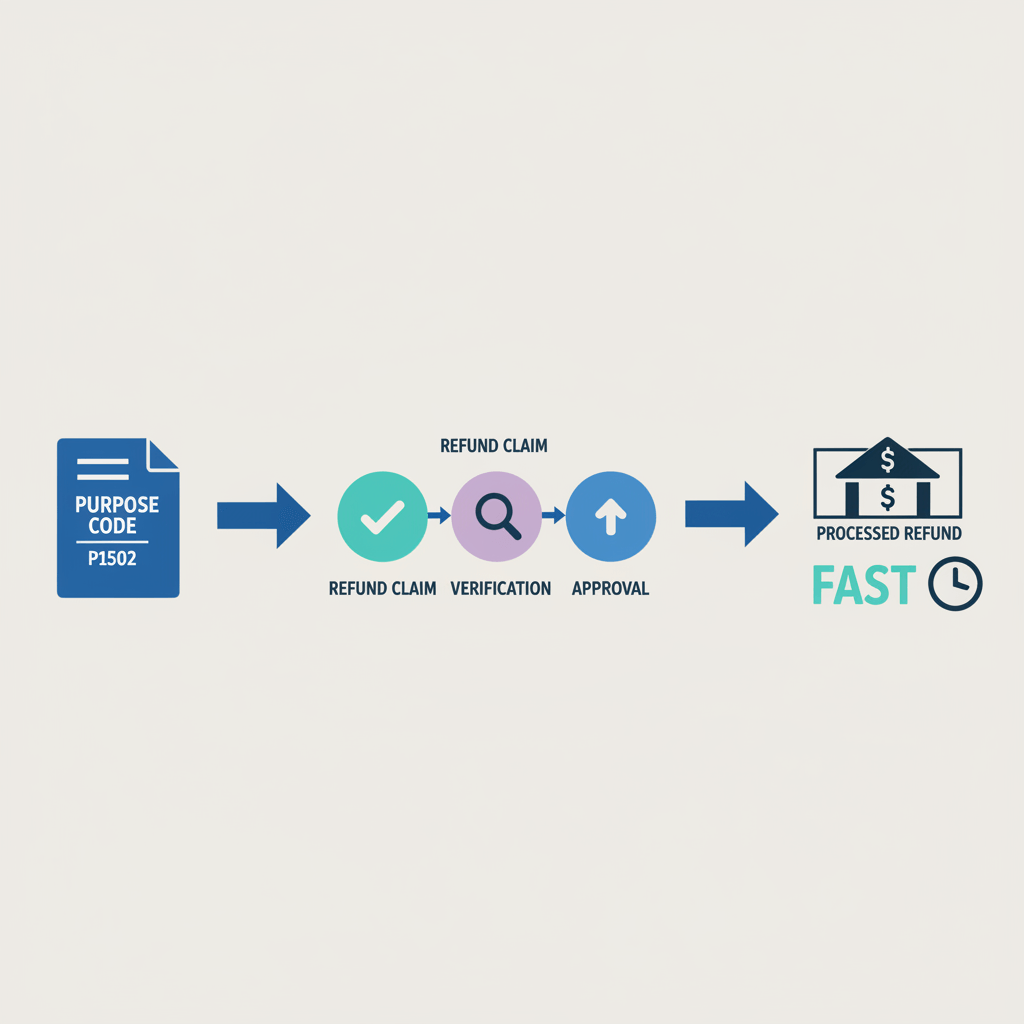
Quick Reference, P1502 Refund Flow and Checklist

Flow

Original export → tagged with the specific P service code → e-FIRA issued
Refund event → chargeback, scope change, overpayment
Tag inbound refund as P1502 → issue credit note, gather proofs
e-FIRA amendment → reconcile ledger and FX differences
Archive documents → audits and tax filing

Checklist
☐ Credit note issued with refund amount and reason
☐ Client proof, emails, chats, contract amendments
☐ Bank instruction specifies P1502
☐ Amended e-FIRA received
☐ Ledger entries reconcile FX differences
☐ All records archived, minimum seven years recommended

Compliance note, always confirm specifics with your bank, platform, or CA, regulations are grounded in the RBI framework and AD processes.

Wrapping Up, Why Getting P1502 Right Matters

Cross border freelancing is rewarding, and compliance keeps it sustainable. The P1502 purpose code is a small detail that makes a big difference, it ensures refunds are recorded cleanly, e-FIRA stays accurate, and tax audits do not turn into headaches.

Document every refund carefully, choose platforms that automate tagging and e-FIRA updates, and when in doubt, consult your CA. Protect your export income with proper tagging, clean records, and smart tools like Karbon Business.

Further reading, Skydo’s P1502 purpose code guide.

FAQ

What is P1502 refund code for freelancers in India, and when exactly should I use it?

P1502 is the RBI purpose code for inward remittances that reverse or refund previously realized export proceeds. Use it whenever you return money that was earlier received and declared as export income, for example, chargebacks, duplicate payments recalled, scope reduction refunds. Tagging the refund as P1502 keeps your e-FIRA and RBI reporting accurate, and platforms like Karbon Business auto tag such refunds to reduce errors.

I accidentally tagged a refund under P1010, how do I correct this without getting into compliance trouble?

Contact your bank or authorized dealer immediately, ask them to amend the entry to P1502, and request the updated e-FIRA showing net realized export income. Do not wait until year end, early correction prevents reconciliation mismatches and audit flags. If you use Karbon Business, support can coordinate with the AD to issue the amendment faster.

Does P1502 work for partial refunds, like 20 percent back on a scope change, and how do I document it?

Yes, partial refunds are common. Issue a credit note stating amount and reason, tag the inbound refund as P1502, reconcile FX differences, and obtain the e-FIRA amendment. Keep the client approval email or contract change order. Platforms such as Karbon Business streamline this flow and generate the e-FIRA within 24 hours, so your records stay clean.

For Upwork or Fiverr chargebacks, what is the right purpose code and any extra steps I should take?

Use P1502 for the inbound adjustment. Maintain proof of delivery, platform dispute threads, and your original invoice and e-FIRA. Ask your bank for the e-FIRA amendment after the refund settles. If you receive internationally via Karbon Business, their team can help tag the refund correctly and compile documents for the AD.

Will my bank issue a fresh e-FIRA for a P1502 refund, or is it an amendment to the original?

Most authorized dealers amend the original e-FIRA to show the net realized export amount, not a fresh document. Practices can vary by bank, so confirm with your AD. With Karbon Business, you typically receive the amended e-FIRA within one business day.

How fast do I need to report a refund to stay within RBI expectations, any amount thresholds I should know?

Report within 30 days of the refund event. Large refunds, often above ₹5 lakhs, may draw extra scrutiny from bank compliance teams, so keep documentation tight, credit note, client approvals, and ledger reconciliation. For regulatory context, see the relevant RBI notification.

My refund came at a different exchange rate than the original payment, how do I handle the FX variance in books?

Record the refund at the rate on the date it hits your account, then book the difference as forex gain or loss. Ensure the INR refund amount matches your documentation, explain rounding differences in the ledger. Solutions like Karbon Business settle at mid market rates and provide clear FX breakdowns for reconciliation.

Do I need GST adjustments for export service refunds, and what about ITC reversals?

Service exports are typically zero rated, you do not charge GST to foreign clients. Refunds reduce revenue recognition, not GST collected. If you claimed ITC on related expenses, you may need to reverse a proportional amount, consult your CA for the exact calculation. Keep the amended e-FIRA and credit note as proof, platforms such as Karbon Business help you retrieve these quickly.

Can I use Karbon Business to receive USD, GBP, or EUR refunds and have them properly tagged as P1502?

Yes. Karbon Business provides virtual accounts in multiple currencies with local rails, tags refunds accurately as P1502, and auto generates e-FIRA within about 24 hours. INR settlement is prompt, and their support team guides you through chargebacks, partial refunds, and documentation.

Which purpose code should I use if I am correcting a wrong entry where the bank mis tagged my original export?

If the original payment was mis tagged, the correcting inflow is reported under P1502. Coordinate with your bank to reverse the incorrect entry and amend the e-FIRA. Keep all proofs, invoice, original e-FIRA, and bank correspondence. Using a platform like Karbon Business can help push the correction through the AD efficiently.

Is P1502 only for services, or can goods export refunds also use it in some cases?

P1502 covers refunds or reversals of non import amounts broadly, which includes services, goods refunds can follow similar correction logic, but outbound corrections may use different codes such as S series. Always confirm with your bank or AD for your specific transaction. When in doubt, ask support on Karbon Business to interpret the case and advise the correct tag.

How do I avoid common mistakes while processing international refunds as a freelancer in India?

Never reuse the original export code, always issue a credit note, reconcile amounts and FX, request the e-FIRA amendment, and archive everything for at least seven years. Read quick primers like Nordea’s purpose code PDF, and choose a platform such as Karbon Business that automates tagging and documentation.

Key takeaways

  • P1502 is the RBI export refund code, use it for reversals or refunds of previously realized export proceeds, never reuse the original export service code.
  • Tagging refunds as P1502 keeps your e-FIRA accurate, prevents inflated export income, and helps avoid audit issues.
  • Maintain a clean trail, original invoice and e-FIRA, credit note, client approvals, ledger reconciliations with FX differences, and request the e-FIRA amendment.
  • Report refunds quickly, RBI expects reporting within 30 days, larger amounts may draw extra scrutiny.
  • Platforms that understand RBI rules and automate tagging, like Karbon Business, reduce errors and save time.

Understanding RBI Purpose Codes for Indian Freelancers

Every time foreign money enters or leaves India, the Reserve Bank of India wants to know the reason. Purpose codes are the labels banks and authorized dealers use to classify these forex transactions, they make cross border monitoring and reporting straightforward.

When you receive international payments for your freelance work, your bank issues a Foreign Inward Remittance Advice, usually as e-FIRA, and it tags your payment with a purpose code. That code can say, this is export income for software services, or, this is a refund adjusting a prior export.

Export codes begin with P, they cover services like technical consulting, audiovisual work, trade commissions, and more, while refunds linked to those exports are handled under P1502.

For additional reference, see Nordea’s India INR purpose of payment codes PDF, and the SVB India POP codes list.

What Exactly is the P1502 Purpose Code?

P1502 is the code for inward remittance entries that reverse incorrect postings or refund non import amounts, in practice, it adjusts prior export receipts when money is being returned. For freelancers, it means the inbound transaction is a correction tied to an earlier export payment you already realized.

Common real world scenarios include chargebacks from platforms, scope reduction refunds, duplicate payments recalled, card payment reversals, and mutual partial settlements after project changes. In each case, the refund must clearly relate to the original export entry and be tagged as P1502.

For deeper context, read Skydo’s P1502 purpose code guide, and Bizfoc’s P1502 explainer.

When to Use P1502 Versus Other Export Purpose Codes

Never reuse your original export service code when processing a refund. If your initial payment was tagged P1010 for technical services or P1007 for audiovisual work, a refund must be tagged as P1502, not as the original code again.

  • Original export payments: use the specific service code, P1010, P1007, P1002, and others.
  • Refunds or reversals of those exports: always P1502.
  • Invoice discounting or advances: these are prepayments, not corrections, no refund code needed.
  • Internal write offs: no funds movement occurs, purpose codes do not apply.
  • Mistaken tagging corrections: the correcting inflow is reported under P1502.

For a cross check, consult the SVB India POP codes list.

Complete Documentation and Compliance Checklist for P1502 Refunds

Compliance requires more than just the right code, you need clear documentation to satisfy your bank’s authorized dealer requirements and survive audits.

  • Original invoice and e-FIRA or FIRC: keep the base documents, see the e-FIRA or FIRC guide for what to collect.
  • Credit note: issue a credit note stating the refund amount, reason, and date.
  • Client communication: store emails, chats, or contract amendments approving the refund.
  • Ledger entries: reconcile FX differences between original realization and refund date.

Authorized dealers typically amend your original e-FIRA to reflect net realized export income after a P1502 refund. Timelines matter, RBI expects refunds to be reported within 30 days, and larger amounts, often above ₹5 lakhs, can trigger additional checks, keep everything organized.

More on this in Skydo’s P1502 guide.

Step by Step Process, How to Handle a Refund Using P1502

Step 1, Pre refund verification

Verify the refund amount, currency, and timing, compare the current exchange rate with the original realization rate, and pull your original invoice and e-FIRA to confirm the initial purpose code and settled INR.

Step 2, Tag the refund correctly

Instruct your bank or payment platform to tag the inbound refund as P1502. If you use a fintech, confirm whether refunds are auto tagged or require manual input. You can also refer to Wise’s purpose code for inward remittance guide for best practices.

Step 3, Reconcile in your books

Issue a credit note, update your invoice tracker, and record any forex gain or loss arising from rate differences.

Step 4, Follow up on e-FIRA

Request an amended e-FIRA from your bank or AD, save all supporting documents, and loop in your CA if refunds cross financial years.

For a quick overview, see Wise’s purpose code guide.

Real Life Examples, Indian Freelancers Using P1502

Example 1, Upwork chargeback
Priya delivers a $500 content package to a US client. The original payment, tagged P1010, settles in INR. A $400 chargeback hits 30 days later. She tags the inbound $400 as P1502, raises a credit note, and the AD issues an amended e-FIRA showing net $100 realized.

Example 2, Direct ACH scope reduction
Rohan is a UI, UX designer. The client pays $1,000 under P1010, then requests a $300 refund when scope shrinks. The refund is received and tagged as P1502, the ledger and e-FIRA are updated to reflect $700 net income.

Example 3, FX rate differences
Anjali invoices £800, realized at ₹103 per GBP. A £300 refund arrives when GBP is at ₹105, she tags it as P1502, records the FX variance as a small gain, and keeps all documents ready for her CA.

Background reading, Bizfoc P1502 explainer.

Common Mistakes Freelancers Make with P1502 and How to Avoid Them

  • Reusing the original export code: never tag a refund with P1010 or other service codes, always use P1502.
  • Skipping the credit note: without it, your refund lacks formal backing.
  • Amount mismatches: reconcile exact amounts and FX rounding, explain any variance in your ledger.
  • Ignoring e-FIRA updates: explicitly request the amendment, do not leave export figures inflated.
  • Using inconsistent rates: use the rate on the refund date, not generic month end figures.

Reference, Nordea purpose of payment codes.

Tax and Accounting Considerations for Export Refunds

Refunds reduce export revenue recognition, if you declared ₹10 lakhs and refund ₹2 lakhs, your net drops to ₹8 lakhs. Most service exports are zero rated for GST, refunds usually do not change that, but you may need to adjust ITC proportionally. Partial refunds that span fiscal years need careful treatment in your books and ITR.

When amounts are large or cross years, consult your CA, they keep your records audit ready. Guidance context, Skydo’s overview.

How Payment Platforms Help Indian Freelancers with P1502 Compliance

Manual bank workflows can be slow, modern fintech platforms understand freelance realities like chargebacks and partial refunds, and they automate purpose code tagging and e-FIRA generation.

Karbon Business provides virtual business checking in USD, GBP, EUR, and CAD, supports local transfers, auto tags refunds as P1502, and issues e-FIRA within 24 hours. INR settlement is fast, mid market, and designed to minimize FX adjustment losses, with support for chargebacks and partial refunds.

Other options include Wise Business, Payoneer, PayPal, RazorpayX International, and WorldFirst. Compare fees, currencies, and compliance workflows based on your client base and volume.

Are There RBI Limits or Timelines?

There is no fixed limit on refunds, but RBI expects reporting within 30 days, and larger refunds can attract scrutiny. For regulatory context, see this RBI notification.

Quick Reference, P1502 Refund Flow and Checklist

Flow

Original export → tagged with the specific P service code → e-FIRA issued
Refund event → chargeback, scope change, overpayment
Tag inbound refund as P1502 → issue credit note, gather proofs
e-FIRA amendment → reconcile ledger and FX differences
Archive documents → audits and tax filing

Checklist
☐ Credit note issued with refund amount and reason
☐ Client proof, emails, chats, contract amendments
☐ Bank instruction specifies P1502
☐ Amended e-FIRA received
☐ Ledger entries reconcile FX differences
☐ All records archived, minimum seven years recommended

Compliance note, always confirm specifics with your bank, platform, or CA, regulations are grounded in the RBI framework and AD processes.

Wrapping Up, Why Getting P1502 Right Matters

Cross border freelancing is rewarding, and compliance keeps it sustainable. The P1502 purpose code is a small detail that makes a big difference, it ensures refunds are recorded cleanly, e-FIRA stays accurate, and tax audits do not turn into headaches.

Document every refund carefully, choose platforms that automate tagging and e-FIRA updates, and when in doubt, consult your CA. Protect your export income with proper tagging, clean records, and smart tools like Karbon Business.

Further reading, Skydo’s P1502 purpose code guide.

FAQ

What is P1502 refund code for freelancers in India, and when exactly should I use it?

P1502 is the RBI purpose code for inward remittances that reverse or refund previously realized export proceeds. Use it whenever you return money that was earlier received and declared as export income, for example, chargebacks, duplicate payments recalled, scope reduction refunds. Tagging the refund as P1502 keeps your e-FIRA and RBI reporting accurate, and platforms like Karbon Business auto tag such refunds to reduce errors.

I accidentally tagged a refund under P1010, how do I correct this without getting into compliance trouble?

Contact your bank or authorized dealer immediately, ask them to amend the entry to P1502, and request the updated e-FIRA showing net realized export income. Do not wait until year end, early correction prevents reconciliation mismatches and audit flags. If you use Karbon Business, support can coordinate with the AD to issue the amendment faster.

Does P1502 work for partial refunds, like 20 percent back on a scope change, and how do I document it?

Yes, partial refunds are common. Issue a credit note stating amount and reason, tag the inbound refund as P1502, reconcile FX differences, and obtain the e-FIRA amendment. Keep the client approval email or contract change order. Platforms such as Karbon Business streamline this flow and generate the e-FIRA within 24 hours, so your records stay clean.

For Upwork or Fiverr chargebacks, what is the right purpose code and any extra steps I should take?

Use P1502 for the inbound adjustment. Maintain proof of delivery, platform dispute threads, and your original invoice and e-FIRA. Ask your bank for the e-FIRA amendment after the refund settles. If you receive internationally via Karbon Business, their team can help tag the refund correctly and compile documents for the AD.

Will my bank issue a fresh e-FIRA for a P1502 refund, or is it an amendment to the original?

Most authorized dealers amend the original e-FIRA to show the net realized export amount, not a fresh document. Practices can vary by bank, so confirm with your AD. With Karbon Business, you typically receive the amended e-FIRA within one business day.

How fast do I need to report a refund to stay within RBI expectations, any amount thresholds I should know?

Report within 30 days of the refund event. Large refunds, often above ₹5 lakhs, may draw extra scrutiny from bank compliance teams, so keep documentation tight, credit note, client approvals, and ledger reconciliation. For regulatory context, see the relevant RBI notification.

My refund came at a different exchange rate than the original payment, how do I handle the FX variance in books?

Record the refund at the rate on the date it hits your account, then book the difference as forex gain or loss. Ensure the INR refund amount matches your documentation, explain rounding differences in the ledger. Solutions like Karbon Business settle at mid market rates and provide clear FX breakdowns for reconciliation.

Do I need GST adjustments for export service refunds, and what about ITC reversals?

Service exports are typically zero rated, you do not charge GST to foreign clients. Refunds reduce revenue recognition, not GST collected. If you claimed ITC on related expenses, you may need to reverse a proportional amount, consult your CA for the exact calculation. Keep the amended e-FIRA and credit note as proof, platforms such as Karbon Business help you retrieve these quickly.

Can I use Karbon Business to receive USD, GBP, or EUR refunds and have them properly tagged as P1502?

Yes. Karbon Business provides virtual accounts in multiple currencies with local rails, tags refunds accurately as P1502, and auto generates e-FIRA within about 24 hours. INR settlement is prompt, and their support team guides you through chargebacks, partial refunds, and documentation.

Which purpose code should I use if I am correcting a wrong entry where the bank mis tagged my original export?

If the original payment was mis tagged, the correcting inflow is reported under P1502. Coordinate with your bank to reverse the incorrect entry and amend the e-FIRA. Keep all proofs, invoice, original e-FIRA, and bank correspondence. Using a platform like Karbon Business can help push the correction through the AD efficiently.

Is P1502 only for services, or can goods export refunds also use it in some cases?

P1502 covers refunds or reversals of non import amounts broadly, which includes services, goods refunds can follow similar correction logic, but outbound corrections may use different codes such as S series. Always confirm with your bank or AD for your specific transaction. When in doubt, ask support on Karbon Business to interpret the case and advise the correct tag.

How do I avoid common mistakes while processing international refunds as a freelancer in India?

Never reuse the original export code, always issue a credit note, reconcile amounts and FX, request the e-FIRA amendment, and archive everything for at least seven years. Read quick primers like Nordea’s purpose code PDF, and choose a platform such as Karbon Business that automates tagging and documentation.
The views expressed in the blogs on this page are solely the opinions of the authors and do not constitute expert advice. While we strive to provide accurate and up-to-date information, we make no representations or warranties of any kind, express or implied, about the completeness, accuracy, reliability, suitability or availability with respect to the website or the information, products, services, or related graphics contained on the website for any purpose. Any reliance you place on such information is therefore strictly at your own risk. We disclaim any liability for any loss or damage including without limitation, indirect or consequential loss or damage, or any loss or damage whatsoever arising from loss of data or profits arising out of, or in connection with, the use of this website.

Find out how we can help you today!

Speak to our foreign payment specialist
Whatsapp-color Created with Sketch.
Whatsapp:
+91 74117 02726
Email:
sales@karboncard.com
Address:
Ground Floor, Karbon Business, 1st Stage Rd, Binnamangala, Hoysala Nagar, Indiranagar, Bengaluru, Karnataka 560038

Find out how we can help you today!

Speak to our foreign payment specialist
Whatsapp-color Created with Sketch.
Whatsapp:
+91 74117 02726
Email:
sales@karboncard.com
Address:
Ground Floor, Karbon Business, 1st Stage Rd, Binnamangala, Hoysala Nagar, Indiranagar, Bengaluru, Karnataka 560038

Latest from our blogs

Latest from our blogs

View All
× Save 50% - Start Now