Business

Purpose Codes: Stop Using P1501 for Export Refunds

Content
share on
Contents
Share On

Key takeaways

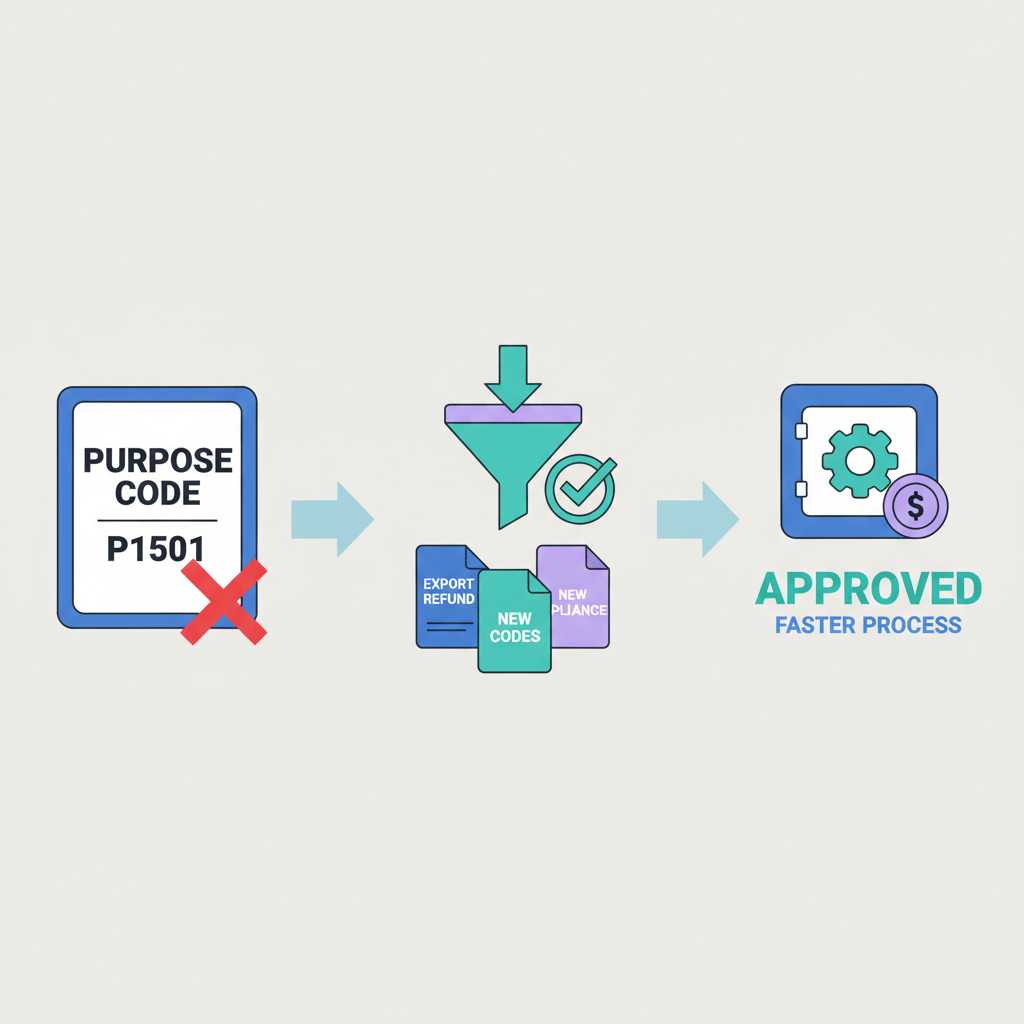
  • P1501 is meant for refunds and rebates on imports, not for export related refunds.
  • For export refunds on services or goods, use export purpose codes in the P13xx series, and follow this guide on inward remittance against export.
  • Misclassifying export refunds under P1501 can trigger fund holds, e-FIRA mismatches, and compliance queries.
  • When a client sends a credit note or overpayment reversal, declare it under P1303 or P1304 for services, or P1301 for goods, and validate the choice with your AD bank.
  • For more context on what P1501 covers, read P1501 purpose code refunds and rebates.
  • Platforms like Karbon Business automate e-FIRA generation, purpose code tagging, and fast INR settlement, reducing errors and delays.
  • Always link refunds to the original invoice and e-FIRA, keep a purpose code register, and maintain clean documentation.
  • For export refund code specifics, consult your AD bank or use export refund code guidelines.

Understanding RBI purpose codes for inward remittance

Every time foreign currency enters India, the Reserve Bank of India needs a valid reason code. Purpose codes are the labels under FEMA that tell banks and regulators what the money is for. If you are a developer, designer, writer, marketer, or consultant receiving payments from abroad, your bank or payment platform will ask for a purpose code during declaration, reconciliation, or while issuing e-FIRA.

These codes directly affect your e-FIRA, GST reconciliation, and bookkeeping. Pick the wrong one, and you invite fund holds, bank queries, and potential penalties. Refunds are the most common area of confusion for exporters, many assume P1501 covers refunds in general, it does not.

The rule of thumb: if the refund relates to what you imported into India, P1501 may apply, if it relates to what you exported, you must use an export purpose code in the P13xx series.


What P1501 purpose code actually covers

P1501 is designated for inward remittances that are refunds or rebates on imports. In practice, you use P1501 when you imported goods, and the foreign supplier refunds you due to overpayment, damaged goods, price adjustments, or billing errors. It does not apply to services or goods that you sold to clients overseas.

For a deeper overview of import specific scenarios, see P1501 refunds and rebates on imports, and for boundaries on where P1501 stops, read P1501 purpose code refunds and rebates.

Why this matters: using P1501 for export refunds distorts your e-FIRA, creates GST mismatches, and can trigger manual reviews. Banks may hold funds until you clarify the classification, accountants struggle to reconcile revenue during tax season.


When not to use P1501 for export rebates

  • New export payments: receiving payment for services or goods sold abroad is an export receipt, use P1301 for goods or P1303 and P1304 for services.
  • Rebates or credit notes on exports: scope reductions, overpayment corrections, and billing adjustments remain export transactions, declare them under export codes.
  • Chargeback reversals: if a previously reversed payment is reinstated, treat it as continuation of export receipt.
  • Government incentives: schemes like RoDTEP have their own codes, do not place them under P1501.
  • Unrelated remittances: dividends, affiliate reimbursements, or platform fees have separate codes.

For a full picture of how P1501 is limited to import refunds, refer to P1501 purpose code refunds and rebates.


Correct refund purpose code for export rebates

Export refunds generally fall under the P1301 to P1399 series. Most service exporters will use P1303 or P1304, goods exporters will often use P1301. When a client sends a partial refund or a credit note, classify it under the same export series that matched the original invoice, and confirm with your AD bank.

  • Scenario 1, overpayment refund: the client sent more than due, they return the extra amount, declare the incoming refund under the original export service code, add a remark referencing the invoice.
  • Scenario 2, scope reduction credit note: a marketing agency cuts hours mid project, you receive a credit note and an adjusted payment, follow export refund code guidelines, not P1501.
  • Scenario 3, quality dispute rebate: a negotiated percentage reduction post delivery is still an export adjustment, document the trail, use the export service code.

For step by step compliance, this guide walks through export purpose codes and inward remittance declarations.


Step by step process for declaring export refunds

  1. Reference the original export transaction: collect the invoice, e-FIRA, and bank reference numbers.
  2. Issue or obtain a credit note: record reason, amount, currency, and link to the original invoice.
  3. Select the correct export purpose code: choose P1303 or P1304 for services, P1301 for goods, never select P1501 for export refunds.
  4. Gather supporting documents: email trail, contract, shipping proof for goods, project proof for services.
  5. Verify your e-FIRA: ensure the declared purpose code matches the issued e-FIRA.
  6. Update your books: record as revenue reduction, track FX gain or loss separately.
  7. Maintain a purpose code register: keep a simple log for audit readiness.


Required documentation for export refund compliance

  • Original invoice and e-FIRA: proves the original export receipt.
  • Credit note or refund memo: formalizes the adjustment.
  • Communication proof: emails, agreements, or dispute resolution notes.
  • Original remittance reference: SWIFT, bank ref, or platform transaction ID.

Missing documentation often leads to bank queries and settlement delays. Platforms like Karbon Business embed these checks into the payment flow, which reduces errors, but you should still retain source files.


How Karbon Business handles export refunds and purpose codes

Karbon Business lets you declare the right purpose code when claiming a payment, so export refunds are tagged correctly from day one. Funds arrive in your foreign currency account, INR settles in 24 to 48 hours, and e-FIRA is auto generated within 24 hours, already carrying the correct code.

If you are unsure about edge cases, Karbon’s support can confirm the right code before submission. High volume freelancers benefit from dedicated account managers, fast responses, and an India first compliance workflow.

Result: fewer bank visits, cleaner e-FIRA trails, zero FX markup, and faster reconciliation.


Tools for managing inward remittances and export refunds

  • Karbon Business: virtual USD, GBP, EUR, CAD accounts, local rails for clients, flat 1% platform fee, auto e-FIRA, and RBI, FEMA compliant processes.
  • Wise Business: transparent FX and multi currency accounts, e-FIRA may be manual depending on bank.
  • Payoneer: popular with marketplace freelancers, watch for markups and fees.
  • PayPal: convenient for small amounts, higher conversion costs for regular use.
  • RazorpayX International: integrated invoicing, FIRA support.
  • WorldFirst and OFX: competitive FX for larger B2B flows.
  • Revolut Business: multi currency wallets and cards, availability for India varies.

Compare platforms on FX transparency, compliance automation, and settlement speed. Ensure you can declare the correct export refund code and link to the original invoice easily.


Common mistakes Indian freelancers make with purpose codes

  • Using P1501 for export rebates: P1501 is only for import refunds.
  • Skipping the credit note: always link refunds to the original invoice and e-FIRA.
  • Booking refunds as new income: record as revenue reduction, not fresh sales.
  • Ignoring currency shifts: account for FX gains or losses separately.
  • Not keeping a purpose code log: a simple register prevents audit pain.
  • Assuming uniform bank interpretation: when in doubt, get written guidance from your AD bank.


Practical checklist for declaring export refunds

Before the refund arrives:

  • Confirm the export purpose code with your AD bank or platform, typically P1303 or P1304 for services, P1301 for goods.
  • Prepare a credit note referencing the original invoice.
  • Gather supporting proof, such as emails or agreements.
  • Locate the original remittance reference.

When declaring the refund:

  • Log into your bank or platform portal.
  • Select the correct export purpose code.
  • Attach the credit note and original invoice.
  • Add a clear remark tying the refund to the invoice.
  • Save the declaration reference.

After funds settle:

  • Request or verify the e-FIRA.
  • Check code, amount, and currency accuracy.
  • Update your ledger and FX gain or loss.
  • File documents in your compliance folder.
  • Update your purpose code register.


Understanding e-FIRA and its role in export refunds

e-FIRA is your official proof of foreign currency receipt and conversion to INR, it includes sender details, amounts, exchange rate, and the purpose code. For export refunds, the e-FIRA enables GST reconciliation, income tax verification, and an audit ready record. If the purpose code is incorrect, expect delays and queries.

Platforms that auto generate e-FIRA, such as Karbon Business, remove manual steps and ensure the right code is recorded quickly.


Accounting best practices for export refunds

  • Reduce revenue, do not add new income: reflect the refund against the original sale.
  • Track FX gain or loss separately: do not embed it in revenue figures.
  • Reconcile e-FIRA with invoices: match numbers and dates, attach PDFs in your accounting system.
  • Maintain a purpose code register: log every transaction for audit and CA review.
  • Consult a CA for complex cases: multi party contracts, cross year refunds, or disputed chargebacks may need expert handling.


Final thoughts, getting purpose codes right matters

The right purpose code keeps your money moving, your e-FIRA clean, and your taxes accurate. P1501 is for import refunds, export refunds sit under P13xx. Reference the original invoice, issue a credit note, declare the correct code, keep documentation tight, and verify your e-FIRA. If you prefer a simpler workflow, consider Karbon Business for purpose code tagging, mid market FX, and fast settlement.

Whether you use a platform or stick with your bank, treat compliance as an advantage, not a chore. A few minutes of diligence today saves hours of headaches later.


FAQ

Is P1501 the right purpose code for export refunds or service credit notes?

No, P1501 is for import related refunds only. For export refunds, select an export purpose code, typically P1303 or P1304 for services, P1301 for goods, and confirm the choice with your AD bank or a platform like Karbon Business.

Which purpose code should I choose if a US client sends back an overpayment on my design invoice?

Treat it as an export adjustment tied to the original invoice, use the same export service series, commonly P1303 or P1304, add a remark referencing the invoice number, and verify the e-FIRA once issued. Platforms like Karbon Business help tag this correctly.

My AD bank portal is showing P1501 for refunds, should I still use it for export rebates?

No, do not use P1501 for export rebates. Ask your AD bank to share the correct export purpose code in writing, then declare the refund under the applicable P13xx code. If you are using Karbon Business, support can confirm the right code before submission.

How do I link a refund to the original export invoice during declaration?

Include the invoice number, date, and a brief remark, for example, “Refund against invoice #12345,” attach the credit note, and provide the original remittance reference. This ensures the e-FIRA ties the refund to your export sale. Karbon Business prompts these fields in the claim flow.

Will using the wrong purpose code delay my payment settlement in India?

Yes, misclassification can push funds into suspense and trigger bank queries. Correct codes, clean documentation, and a clear audit trail speed up settlement. Platforms that automate compliance, such as Karbon Business, reduce these delays.

What documents do Indian freelancers need for an export refund declaration?

Keep the original export invoice and e-FIRA, a credit note or refund memo, email or contract proof explaining the adjustment, and the original remittance reference. With Karbon Business, you can upload these and get an e-FIRA within 24 hours of INR settlement.

How should I record export refunds in my books, can I show them as new income?

Record refunds as reductions against the original revenue, not new income. Track FX differences separately, reconcile your e-FIRA with the invoice, and update your purpose code register. This keeps GST and income tax filings accurate.

Can I hold the refund in USD or EUR for a few weeks before converting to INR to get a better rate?

Yes, if your provider supports currency holding. For example, Karbon Business lets you hold USD, GBP, EUR, or CAD for up to 60 days, so you can choose a favorable conversion window.

I got a chargeback on a consulting invoice that was later reversed, which purpose code applies?

Treat the reinstated amount as continuation of the export receipt, use the export service code you used originally, typically P1303 or P1304, and document the dispute resolution trail. If unsure, confirm with your AD bank or Karbon Business support.

Does e-FIRA timing differ for refunds versus fresh export payments, how fast can I get it?

Traditional banks may take 3 to 7 working days to issue e-FIRA. With Karbon Business, e-FIRA is auto generated within 24 hours of INR settlement, for both fresh receipts and refunds, which simplifies GST reconciliation.

What if my client issues a credit note in EUR but the original invoice was in USD, is that okay?

Yes, but you must document the exchange basis clearly, include both amounts and dates, and track FX gain or loss in your books. Confirm with your AD bank how they prefer remarks to be written, and ensure your e-FIRA aligns with the declared currency.

Is there a simple way to avoid mistakes with purpose codes across multiple clients and projects?

Maintain a purpose code register, standardize your credit note template, and use a platform that enforces correct tagging during claims. Karbon Business provides dropdowns for codes, auto e-FIRA, and account manager support to keep declarations consistent.

Key takeaways

  • P1501 is meant for refunds and rebates on imports, not for export related refunds.
  • For export refunds on services or goods, use export purpose codes in the P13xx series, and follow this guide on inward remittance against export.
  • Misclassifying export refunds under P1501 can trigger fund holds, e-FIRA mismatches, and compliance queries.
  • When a client sends a credit note or overpayment reversal, declare it under P1303 or P1304 for services, or P1301 for goods, and validate the choice with your AD bank.
  • For more context on what P1501 covers, read P1501 purpose code refunds and rebates.
  • Platforms like Karbon Business automate e-FIRA generation, purpose code tagging, and fast INR settlement, reducing errors and delays.
  • Always link refunds to the original invoice and e-FIRA, keep a purpose code register, and maintain clean documentation.
  • For export refund code specifics, consult your AD bank or use export refund code guidelines.

Understanding RBI purpose codes for inward remittance

Every time foreign currency enters India, the Reserve Bank of India needs a valid reason code. Purpose codes are the labels under FEMA that tell banks and regulators what the money is for. If you are a developer, designer, writer, marketer, or consultant receiving payments from abroad, your bank or payment platform will ask for a purpose code during declaration, reconciliation, or while issuing e-FIRA.

These codes directly affect your e-FIRA, GST reconciliation, and bookkeeping. Pick the wrong one, and you invite fund holds, bank queries, and potential penalties. Refunds are the most common area of confusion for exporters, many assume P1501 covers refunds in general, it does not.

The rule of thumb: if the refund relates to what you imported into India, P1501 may apply, if it relates to what you exported, you must use an export purpose code in the P13xx series.


What P1501 purpose code actually covers

P1501 is designated for inward remittances that are refunds or rebates on imports. In practice, you use P1501 when you imported goods, and the foreign supplier refunds you due to overpayment, damaged goods, price adjustments, or billing errors. It does not apply to services or goods that you sold to clients overseas.

For a deeper overview of import specific scenarios, see P1501 refunds and rebates on imports, and for boundaries on where P1501 stops, read P1501 purpose code refunds and rebates.

Why this matters: using P1501 for export refunds distorts your e-FIRA, creates GST mismatches, and can trigger manual reviews. Banks may hold funds until you clarify the classification, accountants struggle to reconcile revenue during tax season.


When not to use P1501 for export rebates

  • New export payments: receiving payment for services or goods sold abroad is an export receipt, use P1301 for goods or P1303 and P1304 for services.
  • Rebates or credit notes on exports: scope reductions, overpayment corrections, and billing adjustments remain export transactions, declare them under export codes.
  • Chargeback reversals: if a previously reversed payment is reinstated, treat it as continuation of export receipt.
  • Government incentives: schemes like RoDTEP have their own codes, do not place them under P1501.
  • Unrelated remittances: dividends, affiliate reimbursements, or platform fees have separate codes.

For a full picture of how P1501 is limited to import refunds, refer to P1501 purpose code refunds and rebates.


Correct refund purpose code for export rebates

Export refunds generally fall under the P1301 to P1399 series. Most service exporters will use P1303 or P1304, goods exporters will often use P1301. When a client sends a partial refund or a credit note, classify it under the same export series that matched the original invoice, and confirm with your AD bank.

  • Scenario 1, overpayment refund: the client sent more than due, they return the extra amount, declare the incoming refund under the original export service code, add a remark referencing the invoice.
  • Scenario 2, scope reduction credit note: a marketing agency cuts hours mid project, you receive a credit note and an adjusted payment, follow export refund code guidelines, not P1501.
  • Scenario 3, quality dispute rebate: a negotiated percentage reduction post delivery is still an export adjustment, document the trail, use the export service code.

For step by step compliance, this guide walks through export purpose codes and inward remittance declarations.


Step by step process for declaring export refunds

  1. Reference the original export transaction: collect the invoice, e-FIRA, and bank reference numbers.
  2. Issue or obtain a credit note: record reason, amount, currency, and link to the original invoice.
  3. Select the correct export purpose code: choose P1303 or P1304 for services, P1301 for goods, never select P1501 for export refunds.
  4. Gather supporting documents: email trail, contract, shipping proof for goods, project proof for services.
  5. Verify your e-FIRA: ensure the declared purpose code matches the issued e-FIRA.
  6. Update your books: record as revenue reduction, track FX gain or loss separately.
  7. Maintain a purpose code register: keep a simple log for audit readiness.


Required documentation for export refund compliance

  • Original invoice and e-FIRA: proves the original export receipt.
  • Credit note or refund memo: formalizes the adjustment.
  • Communication proof: emails, agreements, or dispute resolution notes.
  • Original remittance reference: SWIFT, bank ref, or platform transaction ID.

Missing documentation often leads to bank queries and settlement delays. Platforms like Karbon Business embed these checks into the payment flow, which reduces errors, but you should still retain source files.


How Karbon Business handles export refunds and purpose codes

Karbon Business lets you declare the right purpose code when claiming a payment, so export refunds are tagged correctly from day one. Funds arrive in your foreign currency account, INR settles in 24 to 48 hours, and e-FIRA is auto generated within 24 hours, already carrying the correct code.

If you are unsure about edge cases, Karbon’s support can confirm the right code before submission. High volume freelancers benefit from dedicated account managers, fast responses, and an India first compliance workflow.

Result: fewer bank visits, cleaner e-FIRA trails, zero FX markup, and faster reconciliation.


Tools for managing inward remittances and export refunds

  • Karbon Business: virtual USD, GBP, EUR, CAD accounts, local rails for clients, flat 1% platform fee, auto e-FIRA, and RBI, FEMA compliant processes.
  • Wise Business: transparent FX and multi currency accounts, e-FIRA may be manual depending on bank.
  • Payoneer: popular with marketplace freelancers, watch for markups and fees.
  • PayPal: convenient for small amounts, higher conversion costs for regular use.
  • RazorpayX International: integrated invoicing, FIRA support.
  • WorldFirst and OFX: competitive FX for larger B2B flows.
  • Revolut Business: multi currency wallets and cards, availability for India varies.

Compare platforms on FX transparency, compliance automation, and settlement speed. Ensure you can declare the correct export refund code and link to the original invoice easily.


Common mistakes Indian freelancers make with purpose codes

  • Using P1501 for export rebates: P1501 is only for import refunds.
  • Skipping the credit note: always link refunds to the original invoice and e-FIRA.
  • Booking refunds as new income: record as revenue reduction, not fresh sales.
  • Ignoring currency shifts: account for FX gains or losses separately.
  • Not keeping a purpose code log: a simple register prevents audit pain.
  • Assuming uniform bank interpretation: when in doubt, get written guidance from your AD bank.


Practical checklist for declaring export refunds

Before the refund arrives:

  • Confirm the export purpose code with your AD bank or platform, typically P1303 or P1304 for services, P1301 for goods.
  • Prepare a credit note referencing the original invoice.
  • Gather supporting proof, such as emails or agreements.
  • Locate the original remittance reference.

When declaring the refund:

  • Log into your bank or platform portal.
  • Select the correct export purpose code.
  • Attach the credit note and original invoice.
  • Add a clear remark tying the refund to the invoice.
  • Save the declaration reference.

After funds settle:

  • Request or verify the e-FIRA.
  • Check code, amount, and currency accuracy.
  • Update your ledger and FX gain or loss.
  • File documents in your compliance folder.
  • Update your purpose code register.


Understanding e-FIRA and its role in export refunds

e-FIRA is your official proof of foreign currency receipt and conversion to INR, it includes sender details, amounts, exchange rate, and the purpose code. For export refunds, the e-FIRA enables GST reconciliation, income tax verification, and an audit ready record. If the purpose code is incorrect, expect delays and queries.

Platforms that auto generate e-FIRA, such as Karbon Business, remove manual steps and ensure the right code is recorded quickly.


Accounting best practices for export refunds

  • Reduce revenue, do not add new income: reflect the refund against the original sale.
  • Track FX gain or loss separately: do not embed it in revenue figures.
  • Reconcile e-FIRA with invoices: match numbers and dates, attach PDFs in your accounting system.
  • Maintain a purpose code register: log every transaction for audit and CA review.
  • Consult a CA for complex cases: multi party contracts, cross year refunds, or disputed chargebacks may need expert handling.


Final thoughts, getting purpose codes right matters

The right purpose code keeps your money moving, your e-FIRA clean, and your taxes accurate. P1501 is for import refunds, export refunds sit under P13xx. Reference the original invoice, issue a credit note, declare the correct code, keep documentation tight, and verify your e-FIRA. If you prefer a simpler workflow, consider Karbon Business for purpose code tagging, mid market FX, and fast settlement.

Whether you use a platform or stick with your bank, treat compliance as an advantage, not a chore. A few minutes of diligence today saves hours of headaches later.


FAQ

Is P1501 the right purpose code for export refunds or service credit notes?

No, P1501 is for import related refunds only. For export refunds, select an export purpose code, typically P1303 or P1304 for services, P1301 for goods, and confirm the choice with your AD bank or a platform like Karbon Business.

Which purpose code should I choose if a US client sends back an overpayment on my design invoice?

Treat it as an export adjustment tied to the original invoice, use the same export service series, commonly P1303 or P1304, add a remark referencing the invoice number, and verify the e-FIRA once issued. Platforms like Karbon Business help tag this correctly.

My AD bank portal is showing P1501 for refunds, should I still use it for export rebates?

No, do not use P1501 for export rebates. Ask your AD bank to share the correct export purpose code in writing, then declare the refund under the applicable P13xx code. If you are using Karbon Business, support can confirm the right code before submission.

How do I link a refund to the original export invoice during declaration?

Include the invoice number, date, and a brief remark, for example, “Refund against invoice #12345,” attach the credit note, and provide the original remittance reference. This ensures the e-FIRA ties the refund to your export sale. Karbon Business prompts these fields in the claim flow.

Will using the wrong purpose code delay my payment settlement in India?

Yes, misclassification can push funds into suspense and trigger bank queries. Correct codes, clean documentation, and a clear audit trail speed up settlement. Platforms that automate compliance, such as Karbon Business, reduce these delays.

What documents do Indian freelancers need for an export refund declaration?

Keep the original export invoice and e-FIRA, a credit note or refund memo, email or contract proof explaining the adjustment, and the original remittance reference. With Karbon Business, you can upload these and get an e-FIRA within 24 hours of INR settlement.

How should I record export refunds in my books, can I show them as new income?

Record refunds as reductions against the original revenue, not new income. Track FX differences separately, reconcile your e-FIRA with the invoice, and update your purpose code register. This keeps GST and income tax filings accurate.

Can I hold the refund in USD or EUR for a few weeks before converting to INR to get a better rate?

Yes, if your provider supports currency holding. For example, Karbon Business lets you hold USD, GBP, EUR, or CAD for up to 60 days, so you can choose a favorable conversion window.

I got a chargeback on a consulting invoice that was later reversed, which purpose code applies?

Treat the reinstated amount as continuation of the export receipt, use the export service code you used originally, typically P1303 or P1304, and document the dispute resolution trail. If unsure, confirm with your AD bank or Karbon Business support.

Does e-FIRA timing differ for refunds versus fresh export payments, how fast can I get it?

Traditional banks may take 3 to 7 working days to issue e-FIRA. With Karbon Business, e-FIRA is auto generated within 24 hours of INR settlement, for both fresh receipts and refunds, which simplifies GST reconciliation.

What if my client issues a credit note in EUR but the original invoice was in USD, is that okay?

Yes, but you must document the exchange basis clearly, include both amounts and dates, and track FX gain or loss in your books. Confirm with your AD bank how they prefer remarks to be written, and ensure your e-FIRA aligns with the declared currency.

Is there a simple way to avoid mistakes with purpose codes across multiple clients and projects?

Maintain a purpose code register, standardize your credit note template, and use a platform that enforces correct tagging during claims. Karbon Business provides dropdowns for codes, auto e-FIRA, and account manager support to keep declarations consistent.
The views expressed in the blogs on this page are solely the opinions of the authors and do not constitute expert advice. While we strive to provide accurate and up-to-date information, we make no representations or warranties of any kind, express or implied, about the completeness, accuracy, reliability, suitability or availability with respect to the website or the information, products, services, or related graphics contained on the website for any purpose. Any reliance you place on such information is therefore strictly at your own risk. We disclaim any liability for any loss or damage including without limitation, indirect or consequential loss or damage, or any loss or damage whatsoever arising from loss of data or profits arising out of, or in connection with, the use of this website.

Find out how we can help you today!

Speak to our foreign payment specialist
Whatsapp-color Created with Sketch.
Whatsapp:
+91 74117 02726
Email:
sales@karboncard.com
Address:
Ground Floor, Karbon Business, 1st Stage Rd, Binnamangala, Hoysala Nagar, Indiranagar, Bengaluru, Karnataka 560038

Find out how we can help you today!

Speak to our foreign payment specialist
Whatsapp-color Created with Sketch.
Whatsapp:
+91 74117 02726
Email:
sales@karboncard.com
Address:
Ground Floor, Karbon Business, 1st Stage Rd, Binnamangala, Hoysala Nagar, Indiranagar, Bengaluru, Karnataka 560038

Latest from our blogs

Latest from our blogs

View All
× Save 50% - Start Now