Business

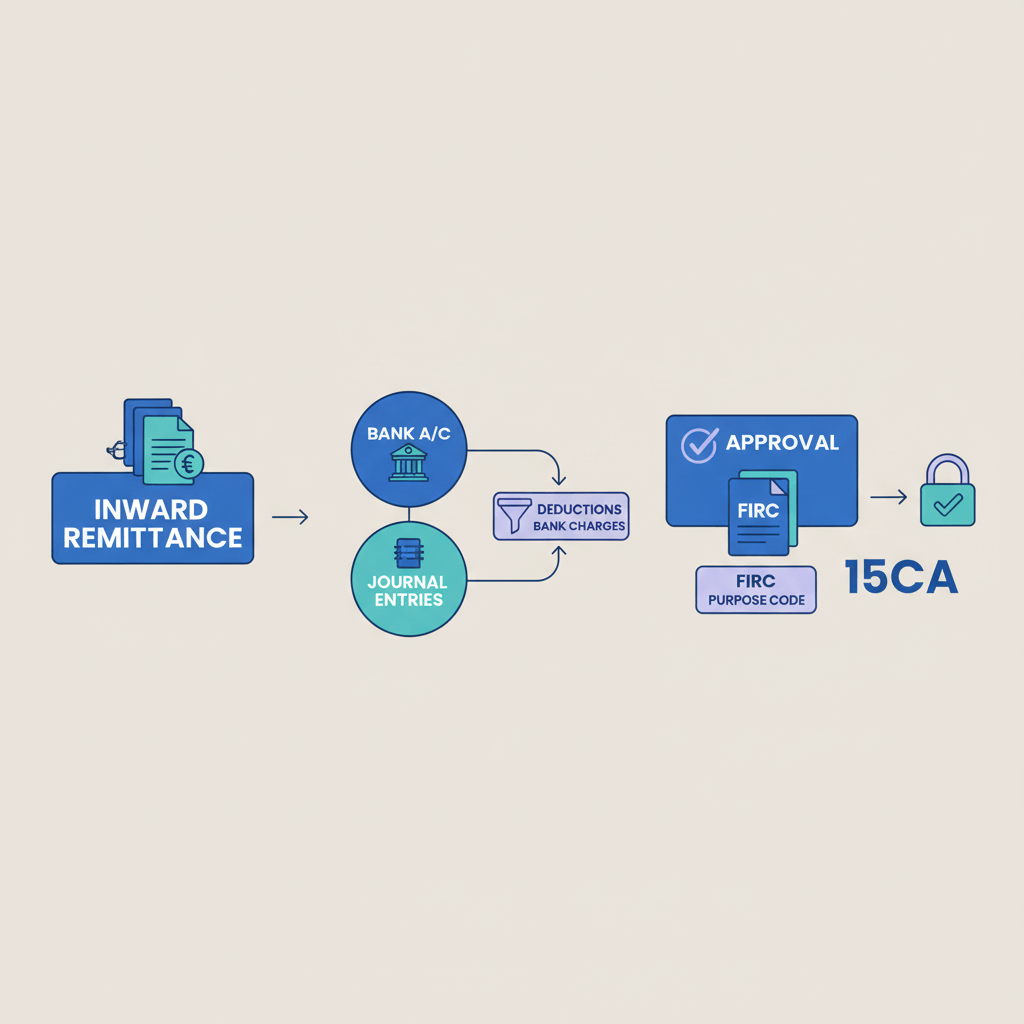
Journal entries for Inward Remittance: Bank Charges Made Easy

Content
share on
Contents
Share On

Key takeaways

  • Always record export revenue at the full invoice amount, then expense bank fees separately, and post forex gains or losses on their own line.
  • Split fees clearly, lifting fee, SWIFT and correspondent charges, and platform fees like the flat 1 percent from Karbon Business, never mix them into income.
  • Use the bank’s realized rate on credit date for conversion, then compute the difference against your invoice rate as forex gain or loss.
  • For India specific rules, claim GST input credit on eligible bank service charges, and match every entry to the e-FIRA certificate.
  • Handle fee codes correctly, OUR means client pays all fees, SHA means shared, BEN means you bear all fees, adjust your entries accordingly.
  • Follow ready to use journal templates for SHA, OUR, BEN, refunds, and platform scenarios, then adapt the numbers to your transaction.
  • Set up your chart of accounts with sub ledgers for lifting fee expense, SWIFT and correspondent fee, platform fees, and forex gain or loss.
  • Use software steps for Tally, Zoho Books, and QuickBooks to streamline receipts, fee splits, and month end FX revaluation.
  • Reconcile each remittance with a simple checklist, invoice amount, net bank credit, fees, forex difference, and e-FIRA reference.
  • If opaque fee breakdowns waste your time, consider bank charges for inward remittance in India guidance and platforms like Karbon Business for cleaner accounting.

What counts as bank charges on inward remittances

If you are an Indian freelancer receiving money from abroad, the net INR credited to your account often looks smaller than your invoice math, because banks and intermediaries deduct fees along the way. Understanding each fee helps you post the correct bank charges entry so your revenue, taxes, and compliance stay accurate.

  • Receiving bank charges: Your Indian bank’s fee for processing foreign funds, typically ₹200 to ₹1,000 per transaction.
  • Lifting fee: An Authorised Dealer bank charge for handling foreign remittances under FEMA and RBI rules. Think of lifting fee accounting as the cost to “lift” foreign currency into INR.
  • SWIFT and correspondent fees: Messaging and intermediary bank costs, often $10 to $30 per bank in the chain, frequently deducted before your bank receives funds.
  • Platform fees: Different from bank fees, for example, Karbon Business charges a flat 1 percent, zero FX markup, record this separately.
  • Fee codes: OUR means client pays all fees, SHA means fees are shared, BEN means you bear all fees.

For a deeper overview, see bank charges for inward remittance in India and this practical inward remittance guide.

Accounting principles to keep in mind

Record revenue at the gross invoice amount. Never net fees into income. Most freelancers use cash basis, some use accrual basis, choose one method and apply it consistently.

Use the RBI reference rate or your bank’s realized rate on the credit date. The difference between your invoice rate and realized rate becomes forex gain or loss, recorded separately.

The golden rule: revenue stays gross, expenses stay separate, forex differences get their own line, documentation ties everything together.

Maintain a complete file, bank advice slip, SWIFT copy, e-FIRA or FIRC certificate, invoice, and platform statements. For context, review inward remittance best practices.

The core how to: journal entries by scenario

Base example: Invoice USD 2,000 at ₹83 equals ₹166,000 expected. Bank credits ₹163,500 at ₹82.9 realized, advice shows ₹1,300 lifting charges and ₹500 SWIFT fees.

Scenario A, SHA fees, shared charges deducted

This is most common. Your client chooses SHA, some fees are deducted before or at credit.

Entry, gross up method:

  • Dr Bank Account ₹163,500
  • Dr Bank Charges Expense ₹1,800, split, Lifting ₹1,300, SWIFT ₹500
  • Dr Forex Loss ₹700, plug to balance
  • Cr Accounts Receivable or Income ₹166,000

Forex loss plug = ₹166,000 minus ₹163,500 minus ₹1,800 equals ₹700. This prevents understating export revenue.

Scenario B, OUR fees, client bears all

Client pays all fees, you receive the full amount.

Entry:

  • Dr Bank Account ₹166,000, at realized rate
  • Cr Forex Gain or Loss, only if realized rate differs
  • Cr Accounts Receivable or Income ₹166,000

No bank charges entry because you did not bear fees. Keep proof from your advice slip for audits.

Scenario C, BEN fees, you bear all charges

Beneficiary pays everything, including correspondent bank cuts.

Example: An extra ₹300 correspondent charge.

  • Dr Bank Account ₹163,200
  • Dr Bank Charges Expense ₹2,100, Lifting ₹1,300, SWIFT ₹500, Correspondent ₹300
  • Dr Forex Loss ₹700
  • Cr Accounts Receivable or Income ₹166,000

If you cannot see the fee breakdown, reconcile the rate first, then treat the unexplained gap as bank charges.

Scenario D, platform fee separate from bank charges

Using a platform like Karbon Business, record platform costs separately from bank charges.

Example: Karbon 1 percent ₹1,660, bank lifting ₹1,300, SWIFT ₹500, net credit ₹162,540.

  • Dr Bank Account ₹162,540
  • Dr Platform Fees Expense ₹1,660, plus GST if applicable
  • Dr Bank Charges Expense ₹1,800
  • Dr or Cr Forex Gain or Loss, plug
  • Cr Accounts Receivable or Income ₹166,000

Zero FX markup makes forex differences simpler to compute.

Scenario E, refunds and chargebacks

Reverse revenue proportionally, bank and platform fees usually remain as expenses.

  • Dr Accounts Receivable or Income ₹166,000
  • Cr Bank Account ₹163,500
  • Cr Refund Payable ₹2,500, if refund exceeds net received

For more examples, see bank charges for inward remittance in India.

How to split GST on fees, India specific rules

Indian bank charges attract 18 percent GST, including lifting fees and SWIFT processing fees billed by your Indian AD bank. If the bank provides a GST invoice, and you are GST registered, claim ITC.

Expanded entry:

  • Dr Bank Account ₹163,500
  • Dr Lifting Fee Expense ₹1,102, base
  • Dr GST Input Credit ₹198, 18 percent
  • Dr SWIFT Fee Expense ₹424
  • Dr GST Input Credit ₹76, 18 percent
  • Dr Forex Loss, plug
  • Cr Income ₹166,000

Foreign intermediary fees charged outside India do not carry Indian GST. For reference, review bank charges for foreign remittance.

Forex handling and period end revaluation

Use realized rate on the credit date. If you hold foreign currency in a virtual account, revalue at month end, then post unrealized gain or loss, later clear it when you convert.

Month end revaluation:

  • Dr Forex Loss, Unrealized ₹500, Credit Foreign Currency Bank ₹500, if USD weakened
  • Dr Foreign Currency Bank ₹500, Credit Forex Gain, Unrealized ₹500, if USD strengthened

Conversion example: Held $1,000, revalued ₹83,000 to ₹82,500, then converted at ₹82.80 equals ₹82,800, reverse ₹500 unrealized, book ₹200 realized loss.

Reconciliation checklist for every inward remittance

  • Match invoice amount to gross revenue recorded.
  • Confirm net bank credit equals the Bank Account debit in your entry.
  • Verify fee code, OUR, SHA, BEN, from advice slip or SWIFT copy.
  • Split all fees, lifting, SWIFT, correspondent, platform, each on its own expense line.
  • Compute forex difference using invoice rate versus realized rate, multiplied by the foreign amount.
  • File supporting documents, invoice, bank statement, advice slip, GST breakup, e-FIRA certificate, platform report.
  • Cross reference e-FIRA details, sender, purpose code, and gross amount.
  • Maintain a simple worksheet, invoice amount, fees by type, net credit, forex difference, e-FIRA reference.

Software specific steps for recording bank charges

Chart of accounts structure

  • Bank Charges Expense, parent
  • Lifting Fee Expense
  • SWIFT and Correspondent Fee
  • Platform Fees, for Karbon, Wise, Payoneer
  • Forex Gain or Loss, under Other Income or Other Expense

Tally ERP steps

Create ledgers under Indirect Expenses, and configure GST where applicable. For detailed setup, see accounting integrations for Tally foreign receipts.

  1. Press F6, Receipt Voucher.
  2. Select Bank Account ledger.
  3. Enter ₹163,500 as receipt amount.
  4. Add fee lines, lifting base and GST, SWIFT base and GST, plus forex plug.
  5. Credit Sales or Income ₹166,000.
  6. Attach invoice reference and client name.
  7. Use cost centre tagging by client or project.

Zoho Books steps

  1. Enable multicurrency.
  2. Banking, Add Transaction, deposit ₹163,500.
  3. Split Transaction into lifting, SWIFT, platform fees, and forex difference.
  4. Credit Income for ₹166,000.
  5. Attach invoice and advice slip.

QuickBooks Online steps

  1. Enable multicurrency.
  2. New, Bank Deposit, select Indian bank.
  3. Add funds, line for Income or Accounts Receivable ₹166,000.
  4. Add negative lines for lifting and SWIFT fees, for a net ₹163,500.
  5. Add forex difference if needed, then save and attach documents.

Worked examples with copy paste templates

Template 1, cash basis, SHA fees with GST split

Date: [Receipt Date]
Narration: Inward remittance from [Client Name], Invoice [Number]

Dr Bank Account                     163,500
Dr Lifting Fee Expense               1,102
Dr GST Input Credit                    198
Dr SWIFT Fee Expense                   424
Dr GST Input Credit                     76
Dr Forex Loss                          700
  Cr Sales Income                            166,000

Supporting docs: Invoice, Bank Advice, e-FIRA

Template 2, accrual basis, OUR fees with later settlement

Date: [Invoice Date]
Narration: Invoice [Number] raised to [Client Name]

Dr Accounts Receivable              166,000
  Cr Sales Income                            166,000
Date: [Receipt Date]
Narration: Payment received against Invoice [Number]

Dr Bank Account                     167,200
  Cr Accounts Receivable                     166,000
  Cr Forex Gain                               1,200

Template 3, platform fee plus bank charges

Date: [Receipt Date]
Narration: Inward remittance via Karbon, Invoice [Number]

Dr Bank Account                     162,741
Dr Platform Fees Expense             1,660
Dr GST Input Credit                    299
Dr Lifting Fee Expense               1,102
Dr GST Input Credit                    198
  Cr Sales Income                            166,000
  Cr Forex Gain                                 200

Supporting docs: Karbon transaction report, Bank statement, e-FIRA

Gross versus net recording, quick comparison

Wrong approach, netting fees into income understates export revenue and complicates compliance.

Dr Bank Account                     163,500
  Cr Sales Income                            163,500

Right approach, gross recording shows true revenue and clean operating expenses.

Dr Bank Account                     163,500
Dr Bank Charges Expense              1,800
Dr Forex Loss                          700
  Cr Sales Income                            166,000

Common mistakes to avoid when recording bank charges

  • Netting fees into income, which understates export revenue and can affect incentives.
  • Treating intermediary cuts as forex loss without requesting a SWIFT or correspondent breakdown.
  • Missing GST input tax credit on eligible fees, keep tax invoices and advice slips.
  • Ignoring e-FIRA linkage, always match entries to the certificate and store it with the invoice.
  • Mixing platform fees with bank charges, keep Karbon Business platform fees separate.
  • Using inconsistent forex rates within one entry, pick one rate and balance with forex gain or loss.
  • Skipping month end revaluation for held foreign currency balances, mark to market monthly.

How Karbon Business simplifies bank charge accounting

Karbon Business provides detailed transaction breakdowns, flat 1 percent platform fee, zero FX markup using mid market rates, and automatic e-FIRA within 24 hours. This transparency makes entries straightforward, bank debit for net INR, platform fee debit plus GST input credit, and income credit at the full invoice amount.

Holding foreign currency up to 60 days gives you control over timing conversion. Month end revaluation becomes a simple journal, and realized rates are clear when you convert, reducing guesswork.

Inward remittance tools to consider for cleaner accounting

  • Karbon Business, built for Indian freelancers, virtual USD, GBP, EUR, CAD accounts, local transfers, flat fees, zero FX markup, auto e-FIRA.
  • Wise Business, transparent fees and mid market rates, India settlement may need an AD bank.
  • Payoneer, marketplace friendly, FX includes markup, e-FIRA via Indian bank steps.
  • PayPal, widely used, higher fees and spreads, reconciliation can be complex.
  • RazorpayX International, virtual accounts with streamlined INR settlement.
  • Tazapay, B2B with escrow features and compliance support.
  • OFX and WorldFirst, competitive FX for higher volumes.
  • Revolut Business, multi currency, verify India availability and RBI compliance.

Taking the next step, implement clean entries this month

Set up ledgers for lifting fee, SWIFT fee, platform fees, and forex differences, then use the scenario templates that fit your fee arrangement, SHA, OUR, or BEN. Make it routine to request the detailed advice slip and file it with your invoice and e-FIRA.

If you are still wrestling with unclear fees or missing documentation, explore platforms designed for Indian freelancers. Karbon Business offers the transparency, speed, and automated compliance that turns a lengthy reconciliation into a quick, audit ready workflow.

Need help, reach Karbon support via WhatsApp, email support@karboncard.com. Clean books start with clean data, and clean data comes from the right payments and accounting setup.

FAQ

How do I pass the journal entry for bank charges on inward remittance when my client selects SHA?

Debit your Bank Account for the net INR credited, debit Bank Charges Expense split into lifting fee and SWIFT or correspondent fees, debit Forex Loss as a plug to balance, credit Sales Income or Accounts Receivable for the full invoice amount. This gross up method keeps export revenue accurate and separates operating costs.

What exactly is lifting fee accounting, and is GST applicable on it?

Lifting fee is your Authorised Dealer bank’s charge for processing foreign remittances under FEMA and RBI. Create a Lifting Fee Expense ledger under Bank Charges Expense. It usually attracts 18 percent GST, if your bank issues a GST invoice you can claim input tax credit in GSTR 3B, provided you are GST registered.

How should I record SWIFT fees when my advice slip shows the amount in USD only?

Convert the USD fee using your bank’s realized rate for the same credit date, then debit SWIFT Fee Expense for the INR equivalent. If the fee was deducted before the funds reached you, it is already reflected in a lower net credit, so you still gross up revenue to the full invoice amount and use a forex gain or loss line to balance.

Cash basis or accrual basis, which is better for Indian freelancers getting paid internationally?

Both work, cash basis records income when the money hits your bank, accrual records income on invoice date and clears Accounts Receivable on receipt. Pick one approach and apply it consistently. If you use accrual, remember to reconcile the realized rate on receipt date and book forex gain or loss separately.

How do I record platform fees separately from bank charges with an example using Karbon Business?

Post platform fees to a Platform Fees Expense ledger, for example, Karbon Business charges a flat 1 percent with zero FX markup. Your entry becomes, Dr Bank Account for net INR, Dr Platform Fees Expense plus GST input credit, Dr Bank Charges Expense for any lifting or SWIFT fees, Dr or Cr Forex Gain or Loss to balance, Cr Income or Accounts Receivable for the full invoice amount.

How can I claim GST input tax credit on bank fees, and what documents do I need?

Collect the GST invoice or tax breakup on your bank advice for lifting and SWIFT fees charged by your Indian AD bank. Post the base amounts to fee expense ledgers and the GST portion to GST Input Credit. Attach the invoice and advice slip, then claim ITC in GSTR 3B. Foreign intermediary fees do not carry Indian GST, expense them fully without ITC.

What do I do when the bank credits less than expected, how do I split fees and forex differences correctly?

First, compare your invoice rate with the bank’s realized rate to compute the forex difference on the foreign amount. Next, identify visible fees, lifting, SWIFT, correspondent, and platform, then gross up your revenue to the invoice amount. Any remaining unexplained shortfall after rate reconciliation can be treated as additional bank charges, and you should request a detailed SWIFT copy from your bank.

How should I handle OUR, BEN, and SHA fee codes in my accounting entries?

OUR means the client pays all fees, you record full invoice amount as income, and only adjust for forex gain or loss if rates differ. SHA means shared fees, you record net bank credit, expense fees you bore, and post forex plug to balance. BEN means you bear all charges, expect more fee lines, lifting, SWIFT, correspondent, and lower net bank credit, revenue still stays at full invoice amount.

How do I reconcile e-FIRA with my invoice and bank statement for compliance?

Match the e-FIRA certificate’s gross amount, sender details, and purpose code to your invoice and accounting entry. Ensure your entry shows the gross income, separate fee expenses, and the net bank credit equals the statement. Platforms like Karbon Business generate e-FIRA automatically within 24 hours, simplifying audits.

If a client asks for a refund or a chargeback, how should I reverse entries and treat fees?

Reverse revenue proportionally, debit Income or Accounts Receivable, credit Bank Account for the refund amount, and credit Refund Payable if you need to refund more than the net received. Bank charges and platform fees already incurred generally remain as expenses, since they are non refundable.

How do I do month end revaluation if I hold USD, for example via Karbon Business?

At month end, revalue your foreign currency balance at the current market rate, post unrealized gain or loss between the Foreign Currency Bank account and Forex Gain or Loss, Unrealized. When you convert to INR later, reverse the unrealized entry and book the realized forex gain or loss based on the actual conversion rate shown by the platform.

My client reimbursed bank fees later, how do I account for that?

When the reimbursement arrives, convert the amount at the receipt date rate, then credit the specific Bank Charges Expense ledger you originally used, for example, credit SWIFT Fee Expense. Debit Bank Account for the INR received. This reduces your net expenses in that period and keeps reporting clean.

Key takeaways

  • Always record export revenue at the full invoice amount, then expense bank fees separately, and post forex gains or losses on their own line.
  • Split fees clearly, lifting fee, SWIFT and correspondent charges, and platform fees like the flat 1 percent from Karbon Business, never mix them into income.
  • Use the bank’s realized rate on credit date for conversion, then compute the difference against your invoice rate as forex gain or loss.
  • For India specific rules, claim GST input credit on eligible bank service charges, and match every entry to the e-FIRA certificate.
  • Handle fee codes correctly, OUR means client pays all fees, SHA means shared, BEN means you bear all fees, adjust your entries accordingly.
  • Follow ready to use journal templates for SHA, OUR, BEN, refunds, and platform scenarios, then adapt the numbers to your transaction.
  • Set up your chart of accounts with sub ledgers for lifting fee expense, SWIFT and correspondent fee, platform fees, and forex gain or loss.
  • Use software steps for Tally, Zoho Books, and QuickBooks to streamline receipts, fee splits, and month end FX revaluation.
  • Reconcile each remittance with a simple checklist, invoice amount, net bank credit, fees, forex difference, and e-FIRA reference.
  • If opaque fee breakdowns waste your time, consider bank charges for inward remittance in India guidance and platforms like Karbon Business for cleaner accounting.

What counts as bank charges on inward remittances

If you are an Indian freelancer receiving money from abroad, the net INR credited to your account often looks smaller than your invoice math, because banks and intermediaries deduct fees along the way. Understanding each fee helps you post the correct bank charges entry so your revenue, taxes, and compliance stay accurate.

  • Receiving bank charges: Your Indian bank’s fee for processing foreign funds, typically ₹200 to ₹1,000 per transaction.
  • Lifting fee: An Authorised Dealer bank charge for handling foreign remittances under FEMA and RBI rules. Think of lifting fee accounting as the cost to “lift” foreign currency into INR.
  • SWIFT and correspondent fees: Messaging and intermediary bank costs, often $10 to $30 per bank in the chain, frequently deducted before your bank receives funds.
  • Platform fees: Different from bank fees, for example, Karbon Business charges a flat 1 percent, zero FX markup, record this separately.
  • Fee codes: OUR means client pays all fees, SHA means fees are shared, BEN means you bear all fees.

For a deeper overview, see bank charges for inward remittance in India and this practical inward remittance guide.

Accounting principles to keep in mind

Record revenue at the gross invoice amount. Never net fees into income. Most freelancers use cash basis, some use accrual basis, choose one method and apply it consistently.

Use the RBI reference rate or your bank’s realized rate on the credit date. The difference between your invoice rate and realized rate becomes forex gain or loss, recorded separately.

The golden rule: revenue stays gross, expenses stay separate, forex differences get their own line, documentation ties everything together.

Maintain a complete file, bank advice slip, SWIFT copy, e-FIRA or FIRC certificate, invoice, and platform statements. For context, review inward remittance best practices.

The core how to: journal entries by scenario

Base example: Invoice USD 2,000 at ₹83 equals ₹166,000 expected. Bank credits ₹163,500 at ₹82.9 realized, advice shows ₹1,300 lifting charges and ₹500 SWIFT fees.

Scenario A, SHA fees, shared charges deducted

This is most common. Your client chooses SHA, some fees are deducted before or at credit.

Entry, gross up method:

  • Dr Bank Account ₹163,500
  • Dr Bank Charges Expense ₹1,800, split, Lifting ₹1,300, SWIFT ₹500
  • Dr Forex Loss ₹700, plug to balance
  • Cr Accounts Receivable or Income ₹166,000

Forex loss plug = ₹166,000 minus ₹163,500 minus ₹1,800 equals ₹700. This prevents understating export revenue.

Scenario B, OUR fees, client bears all

Client pays all fees, you receive the full amount.

Entry:

  • Dr Bank Account ₹166,000, at realized rate
  • Cr Forex Gain or Loss, only if realized rate differs
  • Cr Accounts Receivable or Income ₹166,000

No bank charges entry because you did not bear fees. Keep proof from your advice slip for audits.

Scenario C, BEN fees, you bear all charges

Beneficiary pays everything, including correspondent bank cuts.

Example: An extra ₹300 correspondent charge.

  • Dr Bank Account ₹163,200
  • Dr Bank Charges Expense ₹2,100, Lifting ₹1,300, SWIFT ₹500, Correspondent ₹300
  • Dr Forex Loss ₹700
  • Cr Accounts Receivable or Income ₹166,000

If you cannot see the fee breakdown, reconcile the rate first, then treat the unexplained gap as bank charges.

Scenario D, platform fee separate from bank charges

Using a platform like Karbon Business, record platform costs separately from bank charges.

Example: Karbon 1 percent ₹1,660, bank lifting ₹1,300, SWIFT ₹500, net credit ₹162,540.

  • Dr Bank Account ₹162,540
  • Dr Platform Fees Expense ₹1,660, plus GST if applicable
  • Dr Bank Charges Expense ₹1,800
  • Dr or Cr Forex Gain or Loss, plug
  • Cr Accounts Receivable or Income ₹166,000

Zero FX markup makes forex differences simpler to compute.

Scenario E, refunds and chargebacks

Reverse revenue proportionally, bank and platform fees usually remain as expenses.

  • Dr Accounts Receivable or Income ₹166,000
  • Cr Bank Account ₹163,500
  • Cr Refund Payable ₹2,500, if refund exceeds net received

For more examples, see bank charges for inward remittance in India.

How to split GST on fees, India specific rules

Indian bank charges attract 18 percent GST, including lifting fees and SWIFT processing fees billed by your Indian AD bank. If the bank provides a GST invoice, and you are GST registered, claim ITC.

Expanded entry:

  • Dr Bank Account ₹163,500
  • Dr Lifting Fee Expense ₹1,102, base
  • Dr GST Input Credit ₹198, 18 percent
  • Dr SWIFT Fee Expense ₹424
  • Dr GST Input Credit ₹76, 18 percent
  • Dr Forex Loss, plug
  • Cr Income ₹166,000

Foreign intermediary fees charged outside India do not carry Indian GST. For reference, review bank charges for foreign remittance.

Forex handling and period end revaluation

Use realized rate on the credit date. If you hold foreign currency in a virtual account, revalue at month end, then post unrealized gain or loss, later clear it when you convert.

Month end revaluation:

  • Dr Forex Loss, Unrealized ₹500, Credit Foreign Currency Bank ₹500, if USD weakened
  • Dr Foreign Currency Bank ₹500, Credit Forex Gain, Unrealized ₹500, if USD strengthened

Conversion example: Held $1,000, revalued ₹83,000 to ₹82,500, then converted at ₹82.80 equals ₹82,800, reverse ₹500 unrealized, book ₹200 realized loss.

Reconciliation checklist for every inward remittance

  • Match invoice amount to gross revenue recorded.
  • Confirm net bank credit equals the Bank Account debit in your entry.
  • Verify fee code, OUR, SHA, BEN, from advice slip or SWIFT copy.
  • Split all fees, lifting, SWIFT, correspondent, platform, each on its own expense line.
  • Compute forex difference using invoice rate versus realized rate, multiplied by the foreign amount.
  • File supporting documents, invoice, bank statement, advice slip, GST breakup, e-FIRA certificate, platform report.
  • Cross reference e-FIRA details, sender, purpose code, and gross amount.
  • Maintain a simple worksheet, invoice amount, fees by type, net credit, forex difference, e-FIRA reference.

Software specific steps for recording bank charges

Chart of accounts structure

  • Bank Charges Expense, parent
  • Lifting Fee Expense
  • SWIFT and Correspondent Fee
  • Platform Fees, for Karbon, Wise, Payoneer
  • Forex Gain or Loss, under Other Income or Other Expense

Tally ERP steps

Create ledgers under Indirect Expenses, and configure GST where applicable. For detailed setup, see accounting integrations for Tally foreign receipts.

  1. Press F6, Receipt Voucher.
  2. Select Bank Account ledger.
  3. Enter ₹163,500 as receipt amount.
  4. Add fee lines, lifting base and GST, SWIFT base and GST, plus forex plug.
  5. Credit Sales or Income ₹166,000.
  6. Attach invoice reference and client name.
  7. Use cost centre tagging by client or project.

Zoho Books steps

  1. Enable multicurrency.
  2. Banking, Add Transaction, deposit ₹163,500.
  3. Split Transaction into lifting, SWIFT, platform fees, and forex difference.
  4. Credit Income for ₹166,000.
  5. Attach invoice and advice slip.

QuickBooks Online steps

  1. Enable multicurrency.
  2. New, Bank Deposit, select Indian bank.
  3. Add funds, line for Income or Accounts Receivable ₹166,000.
  4. Add negative lines for lifting and SWIFT fees, for a net ₹163,500.
  5. Add forex difference if needed, then save and attach documents.

Worked examples with copy paste templates

Template 1, cash basis, SHA fees with GST split

Date: [Receipt Date]
Narration: Inward remittance from [Client Name], Invoice [Number]

Dr Bank Account                     163,500
Dr Lifting Fee Expense               1,102
Dr GST Input Credit                    198
Dr SWIFT Fee Expense                   424
Dr GST Input Credit                     76
Dr Forex Loss                          700
  Cr Sales Income                            166,000

Supporting docs: Invoice, Bank Advice, e-FIRA

Template 2, accrual basis, OUR fees with later settlement

Date: [Invoice Date]
Narration: Invoice [Number] raised to [Client Name]

Dr Accounts Receivable              166,000
  Cr Sales Income                            166,000
Date: [Receipt Date]
Narration: Payment received against Invoice [Number]

Dr Bank Account                     167,200
  Cr Accounts Receivable                     166,000
  Cr Forex Gain                               1,200

Template 3, platform fee plus bank charges

Date: [Receipt Date]
Narration: Inward remittance via Karbon, Invoice [Number]

Dr Bank Account                     162,741
Dr Platform Fees Expense             1,660
Dr GST Input Credit                    299
Dr Lifting Fee Expense               1,102
Dr GST Input Credit                    198
  Cr Sales Income                            166,000
  Cr Forex Gain                                 200

Supporting docs: Karbon transaction report, Bank statement, e-FIRA

Gross versus net recording, quick comparison

Wrong approach, netting fees into income understates export revenue and complicates compliance.

Dr Bank Account                     163,500
  Cr Sales Income                            163,500

Right approach, gross recording shows true revenue and clean operating expenses.

Dr Bank Account                     163,500
Dr Bank Charges Expense              1,800
Dr Forex Loss                          700
  Cr Sales Income                            166,000

Common mistakes to avoid when recording bank charges

  • Netting fees into income, which understates export revenue and can affect incentives.
  • Treating intermediary cuts as forex loss without requesting a SWIFT or correspondent breakdown.
  • Missing GST input tax credit on eligible fees, keep tax invoices and advice slips.
  • Ignoring e-FIRA linkage, always match entries to the certificate and store it with the invoice.
  • Mixing platform fees with bank charges, keep Karbon Business platform fees separate.
  • Using inconsistent forex rates within one entry, pick one rate and balance with forex gain or loss.
  • Skipping month end revaluation for held foreign currency balances, mark to market monthly.

How Karbon Business simplifies bank charge accounting

Karbon Business provides detailed transaction breakdowns, flat 1 percent platform fee, zero FX markup using mid market rates, and automatic e-FIRA within 24 hours. This transparency makes entries straightforward, bank debit for net INR, platform fee debit plus GST input credit, and income credit at the full invoice amount.

Holding foreign currency up to 60 days gives you control over timing conversion. Month end revaluation becomes a simple journal, and realized rates are clear when you convert, reducing guesswork.

Inward remittance tools to consider for cleaner accounting

  • Karbon Business, built for Indian freelancers, virtual USD, GBP, EUR, CAD accounts, local transfers, flat fees, zero FX markup, auto e-FIRA.
  • Wise Business, transparent fees and mid market rates, India settlement may need an AD bank.
  • Payoneer, marketplace friendly, FX includes markup, e-FIRA via Indian bank steps.
  • PayPal, widely used, higher fees and spreads, reconciliation can be complex.
  • RazorpayX International, virtual accounts with streamlined INR settlement.
  • Tazapay, B2B with escrow features and compliance support.
  • OFX and WorldFirst, competitive FX for higher volumes.
  • Revolut Business, multi currency, verify India availability and RBI compliance.

Taking the next step, implement clean entries this month

Set up ledgers for lifting fee, SWIFT fee, platform fees, and forex differences, then use the scenario templates that fit your fee arrangement, SHA, OUR, or BEN. Make it routine to request the detailed advice slip and file it with your invoice and e-FIRA.

If you are still wrestling with unclear fees or missing documentation, explore platforms designed for Indian freelancers. Karbon Business offers the transparency, speed, and automated compliance that turns a lengthy reconciliation into a quick, audit ready workflow.

Need help, reach Karbon support via WhatsApp, email support@karboncard.com. Clean books start with clean data, and clean data comes from the right payments and accounting setup.

FAQ

How do I pass the journal entry for bank charges on inward remittance when my client selects SHA?

Debit your Bank Account for the net INR credited, debit Bank Charges Expense split into lifting fee and SWIFT or correspondent fees, debit Forex Loss as a plug to balance, credit Sales Income or Accounts Receivable for the full invoice amount. This gross up method keeps export revenue accurate and separates operating costs.

What exactly is lifting fee accounting, and is GST applicable on it?

Lifting fee is your Authorised Dealer bank’s charge for processing foreign remittances under FEMA and RBI. Create a Lifting Fee Expense ledger under Bank Charges Expense. It usually attracts 18 percent GST, if your bank issues a GST invoice you can claim input tax credit in GSTR 3B, provided you are GST registered.

How should I record SWIFT fees when my advice slip shows the amount in USD only?

Convert the USD fee using your bank’s realized rate for the same credit date, then debit SWIFT Fee Expense for the INR equivalent. If the fee was deducted before the funds reached you, it is already reflected in a lower net credit, so you still gross up revenue to the full invoice amount and use a forex gain or loss line to balance.

Cash basis or accrual basis, which is better for Indian freelancers getting paid internationally?

Both work, cash basis records income when the money hits your bank, accrual records income on invoice date and clears Accounts Receivable on receipt. Pick one approach and apply it consistently. If you use accrual, remember to reconcile the realized rate on receipt date and book forex gain or loss separately.

How do I record platform fees separately from bank charges with an example using Karbon Business?

Post platform fees to a Platform Fees Expense ledger, for example, Karbon Business charges a flat 1 percent with zero FX markup. Your entry becomes, Dr Bank Account for net INR, Dr Platform Fees Expense plus GST input credit, Dr Bank Charges Expense for any lifting or SWIFT fees, Dr or Cr Forex Gain or Loss to balance, Cr Income or Accounts Receivable for the full invoice amount.

How can I claim GST input tax credit on bank fees, and what documents do I need?

Collect the GST invoice or tax breakup on your bank advice for lifting and SWIFT fees charged by your Indian AD bank. Post the base amounts to fee expense ledgers and the GST portion to GST Input Credit. Attach the invoice and advice slip, then claim ITC in GSTR 3B. Foreign intermediary fees do not carry Indian GST, expense them fully without ITC.

What do I do when the bank credits less than expected, how do I split fees and forex differences correctly?

First, compare your invoice rate with the bank’s realized rate to compute the forex difference on the foreign amount. Next, identify visible fees, lifting, SWIFT, correspondent, and platform, then gross up your revenue to the invoice amount. Any remaining unexplained shortfall after rate reconciliation can be treated as additional bank charges, and you should request a detailed SWIFT copy from your bank.

How should I handle OUR, BEN, and SHA fee codes in my accounting entries?

OUR means the client pays all fees, you record full invoice amount as income, and only adjust for forex gain or loss if rates differ. SHA means shared fees, you record net bank credit, expense fees you bore, and post forex plug to balance. BEN means you bear all charges, expect more fee lines, lifting, SWIFT, correspondent, and lower net bank credit, revenue still stays at full invoice amount.

How do I reconcile e-FIRA with my invoice and bank statement for compliance?

Match the e-FIRA certificate’s gross amount, sender details, and purpose code to your invoice and accounting entry. Ensure your entry shows the gross income, separate fee expenses, and the net bank credit equals the statement. Platforms like Karbon Business generate e-FIRA automatically within 24 hours, simplifying audits.

If a client asks for a refund or a chargeback, how should I reverse entries and treat fees?

Reverse revenue proportionally, debit Income or Accounts Receivable, credit Bank Account for the refund amount, and credit Refund Payable if you need to refund more than the net received. Bank charges and platform fees already incurred generally remain as expenses, since they are non refundable.

How do I do month end revaluation if I hold USD, for example via Karbon Business?

At month end, revalue your foreign currency balance at the current market rate, post unrealized gain or loss between the Foreign Currency Bank account and Forex Gain or Loss, Unrealized. When you convert to INR later, reverse the unrealized entry and book the realized forex gain or loss based on the actual conversion rate shown by the platform.

My client reimbursed bank fees later, how do I account for that?

When the reimbursement arrives, convert the amount at the receipt date rate, then credit the specific Bank Charges Expense ledger you originally used, for example, credit SWIFT Fee Expense. Debit Bank Account for the INR received. This reduces your net expenses in that period and keeps reporting clean.

The views expressed in the blogs on this page are solely the opinions of the authors and do not constitute expert advice. While we strive to provide accurate and up-to-date information, we make no representations or warranties of any kind, express or implied, about the completeness, accuracy, reliability, suitability or availability with respect to the website or the information, products, services, or related graphics contained on the website for any purpose. Any reliance you place on such information is therefore strictly at your own risk. We disclaim any liability for any loss or damage including without limitation, indirect or consequential loss or damage, or any loss or damage whatsoever arising from loss of data or profits arising out of, or in connection with, the use of this website.

Find out how we can help you today!

Speak to our foreign payment specialist
Whatsapp-color Created with Sketch.
Whatsapp:
+91 74117 02726
Email:
sales@karboncard.com
Address:
Ground Floor, Karbon Business, 1st Stage Rd, Binnamangala, Hoysala Nagar, Indiranagar, Bengaluru, Karnataka 560038

Find out how we can help you today!

Speak to our foreign payment specialist
Whatsapp-color Created with Sketch.
Whatsapp:
+91 74117 02726
Email:
sales@karboncard.com
Address:
Ground Floor, Karbon Business, 1st Stage Rd, Binnamangala, Hoysala Nagar, Indiranagar, Bengaluru, Karnataka 560038

Latest from our blogs

Latest from our blogs

View All
× Save 50% - Start Now